

filterTokens, to populate “Discovery” pages where you can showcase tokens that fit specific criteria. From simple search queries to complex filtering and trending data, Codex has you covered across 80+ networks with data on over 70M+ tokens.
Search by Name or Symbol
Start with basic token discovery using phrase search to find tokens by name, symbol, or contract address. ThefilterTokens endpoint supports improved symbol matching when using the phrase parameter with $ prefix (eg: $PEPE). Use the $ prefix for results with improved token symbol matches, or without the $ prefix to return partial token symbol matches. You can also use the token contract address to ensure an exact match.
We also recommend utilizing ranking attributes such as volume24 or trendingScore24, and filters such as liquidity to help ensure search results are relevant.
Example query with $ prefix and trendingScore24 results
Example query with $ prefix and trendingScore24 results
Example query with partial symbol match and volume24 results
Example query with partial symbol match and volume24 results
Discover Trending Tokens
Use ranking attributes and other token metrics to filter for tokens that could be showcased on a trending dashboard or alpha discovery page due to their trading activity over a specific timeframe.Example query with trendingScore24, avg wallet age >1 week, and other filters
Example query with trendingScore24, avg wallet age >1 week, and other filters
While there may be many hundreds of tokens that fit your specific query criteria, keep in mind that
filterTokens is limited to a maximum of 200 results per API call. This is why ranking attributes and specific filters are important to ensure you receive the token results that are most relevant for your query.onFilterTokensUpdated subscription. It accepts the same filter inputs as filterTokens and streams matching tokens as their metrics change, so you can keep a live trending list without polling.
trendingScore and its windowed variants (trendingScore5m through trendingScore24) are not recomputed on a fixed schedule — they update event-driven, alongside each stats update a token receives from trading activity. Actively traded tokens refresh near-continuously, while quiet tokens only update when new trades occur.Verified Metadata
Token and organization metadata on thefilterTokens, token, and tokens endpoints is enriched by The Grid, an ecosystem intelligence platform that collects and human-verifies off-chain data for established Web3 projects.
When Grid data is available, queries return three additional fields: asset (verified token metadata including description, icon, and cross-chain deployments), assetDeployments (a list of every network and address the token is deployed on), and organization (metadata about the issuing organization, including URLs and socials).
This data is not available for every token. The Grid covers established, verified projects and not unverified or newly launched tokens.
For display fields like name, symbol, and description, and any metadata contributions made by Codex will override and take priority over Grid data.
Rank by Community Engagement
Coin Communities are Pump.fun’s native discussion spaces where a token’s holders talk about the coin. Codex surfaces their engagement metrics so you can rank and discover tokens by how active their community is, not just by trading activity.filterTokens exposes four ranking attributes for this:
coinCommunityPostCount— total posts in the communitycoinCommunityMemberCount— total memberscoinCommunityLikeCount— total likescoinCommunityLastPostAt— timestamp of the most recent post, useful for surfacing communities that are currently active
coinCommunity object.
Example query ranking by community post count
Example query ranking by community post count
Advanced Filtering
Analyze tokens based on a robust set of trading metrics such as price, volume, mcap, buy/sell count, launchpad protocols, networks, exchanges, wallet age, and more.Example query to find trending launchpad (Bonk) tokens that have migrated
Example query to find trending launchpad (Bonk) tokens that have migrated
Boolean logic with boolFilter
For most filters, the flat input object is the right tool: every field you set is implicitly ANDed together. Reach for boolFilter when you need different filter conditions for a subsets of tokens. The most common case is per-network thresholds: a token doing 500 transactions a day on a high-activity chain is noise, but on a quieter chain it’s a strong signal. Flat filters force a single threshold across all chains, while boolFilter lets you tune criteria per network in a single query.
boolFilter accepts and, or, and not operators, each containing another filters object. Operators can be nested up to 4 levels deep.
Example: per-network trending screener
Example: per-network trending screener
filterTokens. Check out Defined.fi, or explorer.codex.io, to see more filtering options:
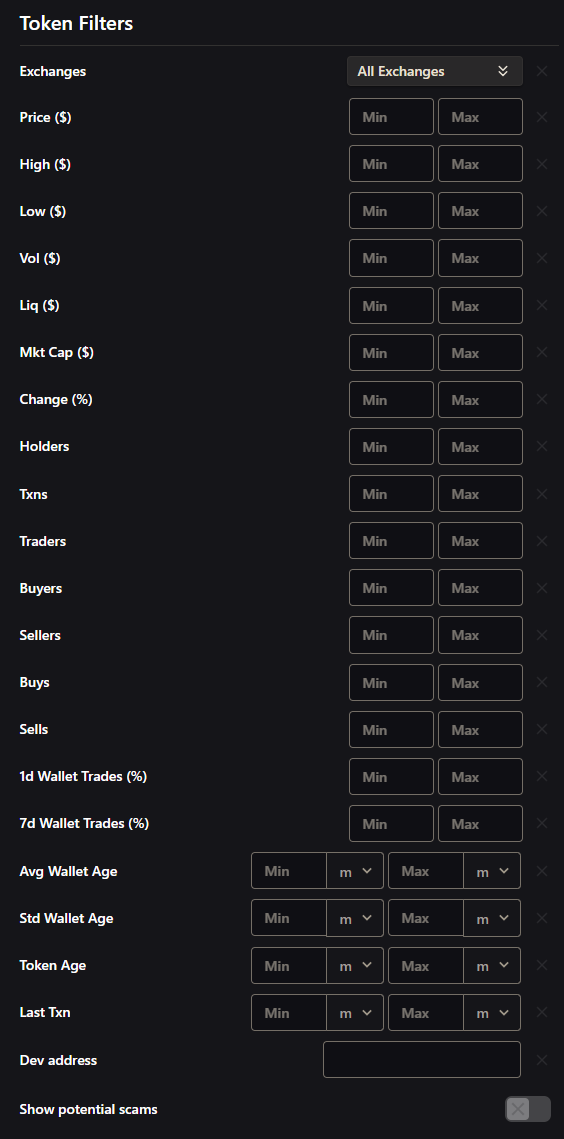
trendingIgnored is adjusted regularly to ensure the best results are shown for trending tokens. Set to true if you want results to include stablecoins, wrapped base tokens, rugs/scams/low quality tokens etc.statsType filters MEV-related events from data to ensure you receive real user activity.- FILTERED: Removes MEV events. Shows “organic” volume.
- UNFILTERED: Includes everything, even MEV events
trendingIgnored: false and statsType: FILTERED for the cleanest data.Tokenized stocks
Tokenized equities, such as the stock tokens on Robinhood Chain, carry thetokenized-stock category, a child of real-world-assets. List them with categoryTokens or add categories: {anyOf: ["tokenized-stock"]} to filterTokens filters. Use noneOf to exclude them. Some ETF and fund wrappers are tagged only real-world-assets, so include that slug when you want every tokenized security (it also matches other RWA tokens).
Example query listing tokenized stocks on Robinhood Chain
Example query listing tokenized stocks on Robinhood Chain
Global Fees Paid
Codex exposes detailed fee breakdowns and MEV analytics across token data, so you can filter and rank tokens by the cost activity they generate rather than just price or volume. Fee fields cover pool fees, base fees, priority fees, builder tips, and L1 data fees, along with derived metrics like fee-to-volume ratio that surface tokens with genuine economic activity versus wash-traded volume. For the full breakdown of components, derived metrics, classifications, and which endpoints expose what, see the Global Fees Paid concepts page. The example below ranks tokens by 1-hour total fees paid, filtered to tokens with meaningful fee activity and a minimum fee-to-volume ratio.Snipers, bundlers, and insiders
Codex labels wallets that bought or received a launchpad token in ways that point to a coordinated or connected launch, then reports how many of those wallets still hold and what share of supply they hold. The data is returned byfilterTokens, by walletActivity on pairMetadata, and by both launchpad subscriptions.
How the numbers work
These rules apply to all three labels.- Labels are per token. A wallet can be a sniper on one token and nothing on another. These are separate from the wallet-wide labels returned by
filterWalletsandwalletLabelTypes, which classify a wallet’s behavior across every token it trades (see Discover traders). - The count is wallets still holding. A labelled wallet that sold everything no longer counts.
- Held % is current balance divided by total supply. It is what the wallets hold now, not what they bought.
- The numbers fall over time. When labelled wallets sell, the count and the percentage drop. That is expected.
- Launchpad tokens only. On
filterTokensand the launchpad subscriptions these fields are null for tokens without a launchpad.tokenWalletStatsreturns zeros instead. Launchpad tokens from before tracking started (November 2025) read 0.
Snipers
Wallets that bought within the first 5 seconds of the token’s first trade. There is no minimum buy size, and the rule is the same on EVM networks and Solana. The creator’s wallet counts as a sniper if it bought in that window, sosniperHeldPercentage can equal devHeldPercentage.
Bundlers
Several wallets that bought the same token in the same block at launch, which usually means one person buying through many wallets. Codex looks for 4 or more wallets buying in the same block on the same pool, each buy worth at least $5, with the buys together adding up to at least 0.05% of total supply. Only buys on the launchpad’s own pool before the token graduates are considered. The rule is the same on EVM networks and Solana.Insiders
Wallets that got the token through a link to the creator instead of buying it on the open market. Codex checks for that link during the token’s early life and applies three rules on every network:- Creation transaction. The wallet bought in the same transaction that created the token and is not the creator.
- From creator. The wallet received the token directly from the creator’s wallet.
- Funded by creator. The wallet’s first-ever funding came from the creator, and it then received the token.
devHeldPercentage.
- EVM (Ethereum, Base, BNB, and others): the three rules above.
- Solana: the three rules above, plus wallets that receive the token by plain transfer shortly after launch without signing the transaction. This catches supply spread across a creator’s own wallets through a middleman.
- Sui, Aptos, Starknet: an older, broader rule that also counts wallets paid by existing insiders, so insider percentages there can read higher.
Suspicious
A single roll-up of every wallet flagged as one or more of the above:suspiciousCount and suspiciousHeldPercentage. Because a wallet can be flagged as a sniper, bundler, and/or insider at once, these are the deduplicated union of those cohorts rather than a simple sum of the three counts. Use them when you want one overall risk number for a token instead of checking each cohort separately.
Fields
sniperCount, bundlerCount, insiderCount, suspiciousCount, devHeldPercentage, sniperHeldPercentage, bundlerHeldPercentage, insiderHeldPercentage, suspiciousHeldPercentage.
Each is available as a result field, a filter (gt, lt, gte, lte), and a ranking attribute on filterTokens.
Example query for these fields using filterTokens
Example query for these fields using filterTokens
Other platforms use different definitions and methodologies for this data, so expect discrepancies between Codex and other sources. Codex only labels wallets that bought the launch together or have a provable link to the creator, and reports only what those wallets still hold, rather than inferring labels from trading behavior. We will continue to adjust these rules as needed to keep the data accurate.
- Multi-Network discovery: Search across multiple networks simultaneously
- Time-based analysis: Filter by creation date, recent activity, or specific timestamps
- Exchange-Specific: Focus on tokens from specific exchanges or launchpad protocols
- Behavioral Filtering: Use wallet age and trading pattern metrics to assess token quality
- Risk Management: Filter by risk verdict and reasons, and combine them with liquidity, volume, and the sniper, bundler, insider, and suspicious holdings filters