

Subscriptions (WebSockets) require a Growth or Enterprise plan. Learn more.
What is a Subscription?
A subscription is a persistent connection that pushes data to you in real-time. Instead of repeatedly polling the API for updates, you open a WebSocket connection and tell Codex what data you want to watch. Whenever that data changes, Codex sends you the update automatically. Every message the subscription sends you counts as 1 request against your plan’s monthly limit. For example, if you subscribe to price updates for a token and receive 1,000 updates in an hour, that’s 1,000 requests.When to Use Subscriptions
- Live price feeds — streaming token or pair prices as they change
- Real-time trade notifications — watching for new swaps, mints, or burns as they happen
- Streaming chart updates — keeping OHLCV bars current without polling
- Launchpad monitoring — detecting new token launches and graduation events instantly
- Live holder/balance tracking — watching holder counts or wallet balances update in real-time
How It Works
Subscriptions use the WebSocket protocol. You open a connection towss://graph.codex.io/graphql, authenticate via the connection_init payload, and then send subscribe messages for the data you want.
Try it
Try it
This subscription uses your account’s monthly request limit while active. Stop the subscription when you’re done testing to conserve your limit.
SDK
SDK
If you’re using the SDK, then you can just call
sdk.subscribe with the subscription you want to use and it will handle the connections.onPriceUpdated
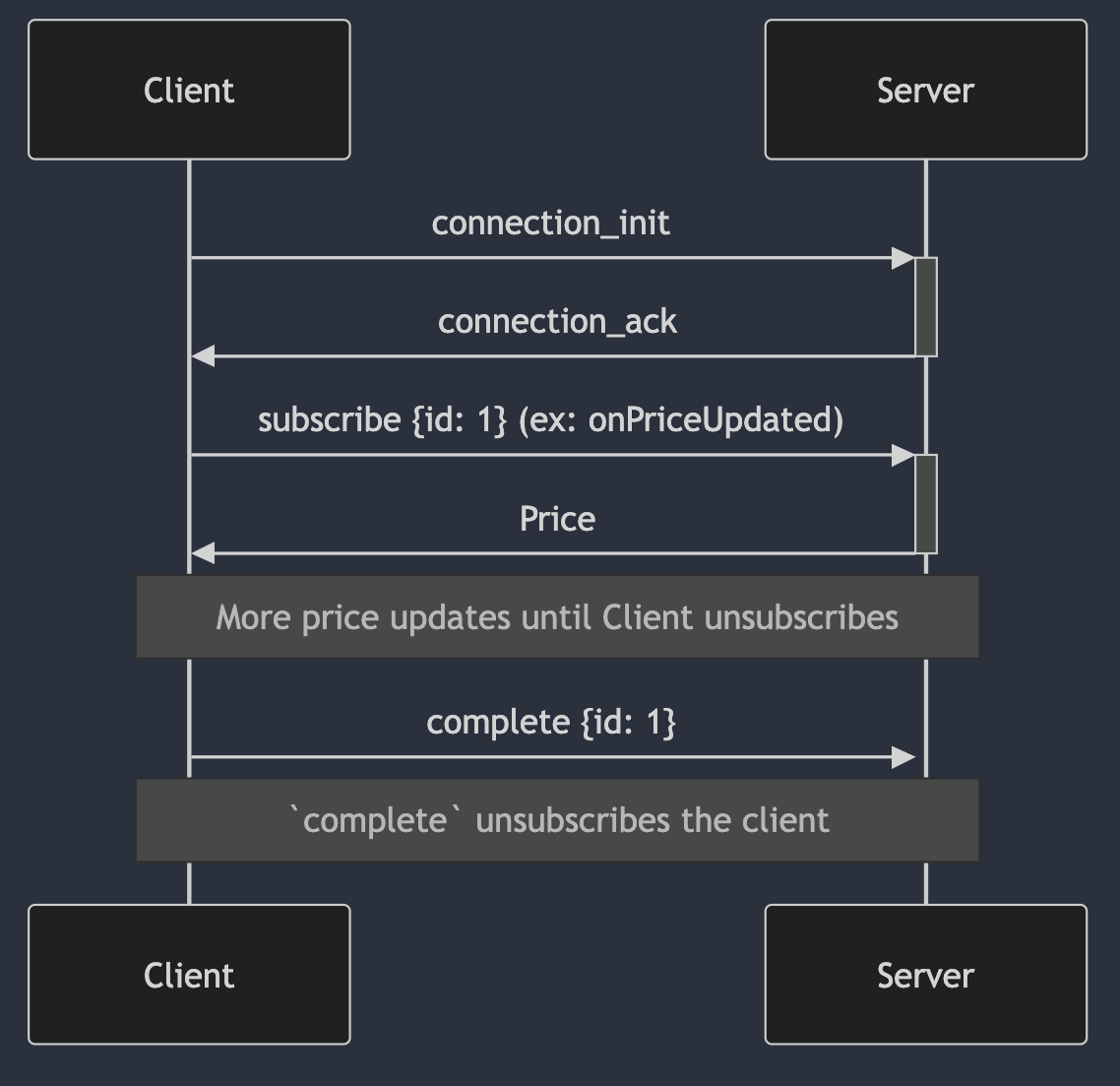
Multiple Subscriptions
You can subscribe multiple times in the same connection, just send additional
subscribe messages.- Throughput of the subscriptions. If you are subscribed to
onTokenEventsCreatedto the SOL token, then you’re going to get a lot more messages than a token with no volume. - The number of tokens you’re watching across all subscriptions on a connection.
onPricesUpdatedaccepts up to 25 tokens per subscription as a hard input cap — that’s an API limit on each call, not a recommendation on connection density. You can run severalonPricesUpdatedsubscriptions on the same connection, just account for the combined token count when sizing the connection. - Your internet connection, the amount of network capacity matters if you’re making a lot of subscriptions.
- Geography (how close is your application to Western US)
onPairMetadataUpdated can be packed considerably denser than this baseline. The ~100-token guideline assumes a typical mix of price/event streams — adjust upward for quiet streams and downward when watching high-volume tokens.
Connection Management
Connection Persistence:- WebSocket connections remain open indefinitely with no automatic server-side disconnection
- Connections require heartbeat messages to stay alive (handled automatically if using our SDK)
- Growth plans are limited to 300 connections. For Enterprise accounts, there isn’t a defined “hard-limit”, however, please contact our team if you have questions about your number of required connections. As each connection can handle multiple subscriptions, our “soft-limit” of connections is rarely reached by our customers.
- No time-based limits on how long subscriptions can run
- Use idle detection hooks (e.g.https://usehooks.com/useidle )
- Pause subscriptions after ‘N’ minutes of inactivity
- Resume when user becomes active again
- This prevents burning through API usage from idle browser tabs
- Implement multiple subscriptions per connection (more reliable, easier to manage)
- Exception: High-volume subscriptions like launchpad events should use dedicated connections
- Proxy data through your backend to serve multiple users from a single subscription
- Example: 10 users viewing the same chart = 1 subscription, instead of 10
Commitment Levels
Event subscriptions accept an optional commitment level that controls how early an event is delivered, trading latency against accuracy. It is set with theEventCommitmentLevel enum:
Confirmed— the most accurate stage; the event has been confirmed. The default, and the only level available on networks other than Solana and Base. Use when correctness matters more than latency.Processed— delivered earlier thanConfirmed, at the cost of some accuracy. On Solana, processed events may later be reorged out; on Base,Processedstreams unconfirmed Flashblocks events ahead of confirmation.Preprocessed— Solana only. The earliest possible signal, surfacing events before routing is finalized.
Confirmed are supported on Solana and Base only, and Preprocessed is Solana-only. Bars subscriptions use a separate BarCommitmentLevel — see Confirmed vs. Unconfirmed data in the Charts recipe.
FAQ
How do I get real-time token volume and holder updates over WebSockets?
How do I get real-time token volume and holder updates over WebSockets?
- Volume: subscribe to
onPairMetadataUpdated—volume*fields update in real time. - Holders:
onHoldersUpdatedis available on Growth and Enterprise plans. If you don’t need a real-time stream, you can also poll theholdersquery.