

Teach your agent about Codex
Paste this into your agent so it knows when to reach for Codex:Codex Skills vs Docs MCP
The Codex Docs MCP lets your AI search the documentation. The skill gives it direct knowledge of the API surface so it can generate queries immediately.
Use both together for the best experience: the skill handles query generation and the MCP fills in details when needed.
What’s included
The skill packages everything an AI agent needs to work with the Codex API:- Operation map: Which endpoint to use for each task (pricing, charting, token discovery, events, wallets, holders, launchpads)
- Auth patterns: API key, and MPP payment flows with header formats
- Query templates: Ready-to-use GraphQL for common operations like
filterTokens,getTokenPrices,getBars - Endpoint playbook: Decision guide for choosing the right operation based on intent — see what your agent can do below
- Session preflight: Required
getNetworkscall to validate network IDs before making requests
What your agent can do
These are the capabilities the skill’s endpoint playbook maps user intent onto. Each card links to the reference page for its primary operation.Discover
Trending Tokens
Rank tokens by trending score, volume, or any of 100+ on-chain signals — live via
onFilterTokensUpdated.Token Screener
Search by phrase and filter on liquidity, market cap, holder behavior, and launchpad lifecycle.
New Launchpad Tokens
Stream newly created launchpad tokens in real time, from creation through graduation.
Top Wallets for a Token
Find the most profitable wallets trading a token, with PnL stats and labels.
Prices & Charts
Token Prices
Current or historical prices for up to 25 tokens per request — live via
onPricesUpdated.Pair Charts
OHLCV candles for any pair at resolutions from 1 second to 1 week — live via
onBarsUpdated.Token Charts
Token-level candles aggregated across top liquidity pairs — live via
onTokenBarsUpdated.Pair Stats
Price, liquidity, volume, and windowed stats for a trading pair — live via
onPairMetadataUpdated.Trades & Events
Token Trades
Every buy and sell for a token — live via
onTokenEventsCreated.Wallet Trades
All trades from a specific wallet — live via
onEventsCreatedByMaker.Wallets & Holders
Wallet PnL & Performance
Profit and loss, volume, and performance over time for any wallet, charted via
walletChart.Holder List
Token holders ordered by balance — live via
onHoldersUpdated.Holder Concentration
Percent of supply held by the top 10 wallets — a quick rug-risk signal.
Prediction Markets
Trending Prediction Events
Discover and search Polymarket and Kalshi events by trending score, volume, or category.
Market Odds
Filter markets and sort by implied probability, open interest, or competitiveness.
Prediction Charts
Per-outcome OHLC price, volume, and open interest — compare up to 10 markets in one request.
Trader Leaderboard
Rank prediction traders by profit, win rate, and volume.
Trader Profile & Positions
All-time and windowed stats plus open positions for any prediction trader.
Prediction Trades
Trade feed filterable by event, market, or trader.
How it works
Once installed, your AI agent uses the skill to:- Pick the right operation: Maps intent (e.g. “get trending tokens”) to the correct GraphQL query (
filterTokens) - Set the correct auth: Chooses between API key headers and MPP payment flow based on context.
- If the user provides an API key, it will use that
- If the user doesn’t provide an API key, it will try to use the MPP payment flow
- Generate valid GraphQL: Uses templates to produce runnable queries with proper variables and selection sets
- Follow best practices: Validates network IDs first, keeps selection sets minimal, batches subscriptions
Authentication
The skill will check to see if you have provided an API key. If you have, it will use that. If you haven’t, it will try to use the MPP payment flow. See the MPP documentation for more information on how to set up MPP.Examples
Example 1: Get a list of dog tokens
Ask your agent:“Get me a list of 20 dog tokens.”It will then check to see if you have provided an API key. Assuming you have enabled MPP, the skill will guide the agent to run it to generate a request like the one below.
To do that, your agent will likely read numerous .md files in the skills directory to understand how to use the skill and perform the query.
Example Response
Example Response
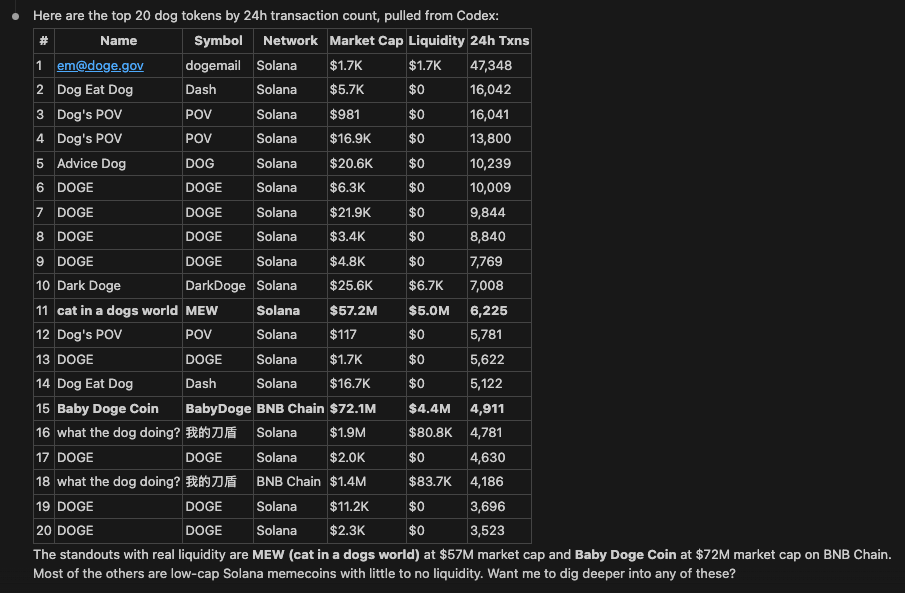
This is not an endorsement of any of these tokens, and they may be scams or rugs. Please do your own research before investing. You can also ask your agent to filter out scams.
Example 2: Get trending prediction events
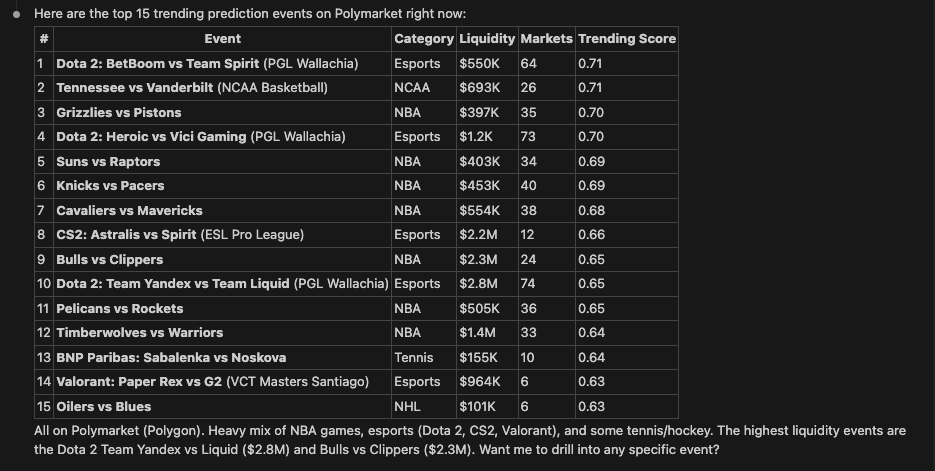
Ask your agent:“Get me a list of 15 trending prediction events.”It will then check to see if you have provided an API key. Assuming you have one, your agent will likely do a query like the following after doing some research on the best endpoint to use:
To do that, your agent will likely read numerous .md files in the skills directory to understand how to use the skill and perform the query.
Example Response
Example Response
Example 3: Find the top traders of a token
Ask your agent:“Who are the most profitable wallets trading WETH on Ethereum?”The skill maps this intent to
filterTokenWallets and generates a query like:
Example 4: Check holder concentration
Ask your agent:“How concentrated is the holder base of this token? Is it a rug risk?”The skill maps this to the
holders query, which includes top-10 concentration alongside the holder list:
top10HoldersPercent on a low-liquidity token is a common rug signal.
Example 5: Stream live prices
Ask your agent:“Stream the live price of SOL into my app.”For real-time intents the skill reaches for subscriptions instead of polling, and generates a
graphql-ws client like:
onPricesUpdated subscription rather than opening one connection per token.