

This endpoint requires a Growth or Enterprise plan. Learn more.
Returns
WalletChartResponse
Arguments
WalletChartInput!
required
See WalletChartInput
Example
Test this query in the Explorer →Visual Example
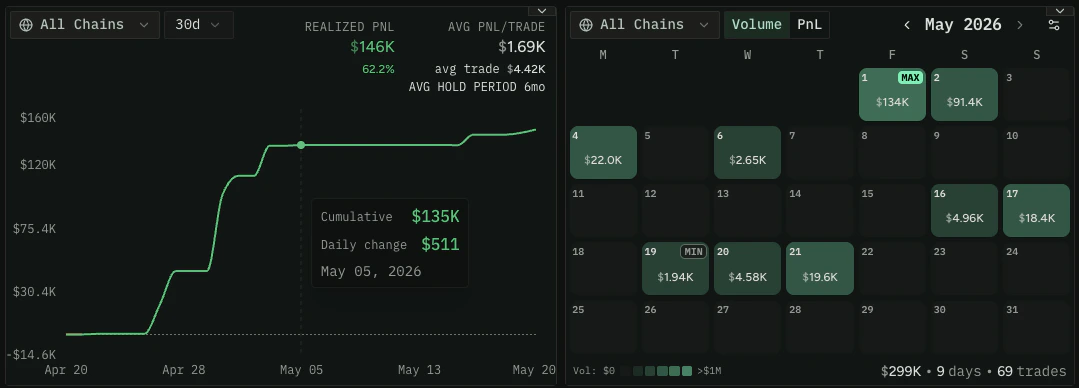
walletChart powers PnL-over-time line charts and daily volume heatmaps for a single
wallet. Here’s what the data looks like rendered on re.defined.fi:
Usage Guidelines
- Requires
walletAddress, arangewithstart/endunix timestamps, and aresolution(60,240,1D, or7D) - Optionally pass
networkIdto scope the chart to a single network — omit it for cross-chain aggregated data - Each data point includes
volumeUsd,realizedProfitUsd, andswapsfor that time bucket volumeUsdAllincludes volume from tokens sold where we may not have a price — usevolumeUsdfor more conservative figures- Check
backfillStateto determine if historical data is fully available —BackfillCompletemeans all historical stats have been processed
Troubleshooting Tips
What do the resolution options mean?
What do the resolution options mean?
60 = 1-hour candles, 240 = 4-hour candles, 1D = daily candles, 7D = weekly candles. Choose a resolution appropriate for your time range — e.g., daily for a multi-week range, hourly for a few days.What does backfillState mean?
What does backfillState mean?
Wallet historical data needs to be computed before it’s available.
BackfillComplete means data is ready. BackfillInProgress or BackfillRequestReceived means it’s still processing — retry after a short wait. BackfillCanceled or BackfillBlocked typically means the wallet was flagged as a bot.Why is realizedProfitUsd negative?
Why is realizedProfitUsd negative?
A negative
realizedProfitUsd means the wallet realized a loss during that time bucket — tokens were sold for less than their acquisition cost. This only reflects closed positions; unrealized gains/losses on held tokens are not included.What's the difference between volumeUsd and volumeUsdAll?
What's the difference between volumeUsd and volumeUsdAll?
volumeUsd only counts volume from tokens where we have a reliable USD price. volumeUsdAll additionally includes volume from tokens that were sold but for which we couldn’t determine a USD price. For most use cases, volumeUsd is the safer metric.Related Recipes
- Wallets: Analyze wallet performance, discover top traders, and build portfolio views