> ## Documentation Index
> Fetch the complete documentation index at: https://docs.codex.io/llms.txt
> Use this file to discover all available pages before exploring further.
# Discover Traders
> Understand how to find and filter high-performing wallets with the Codex API
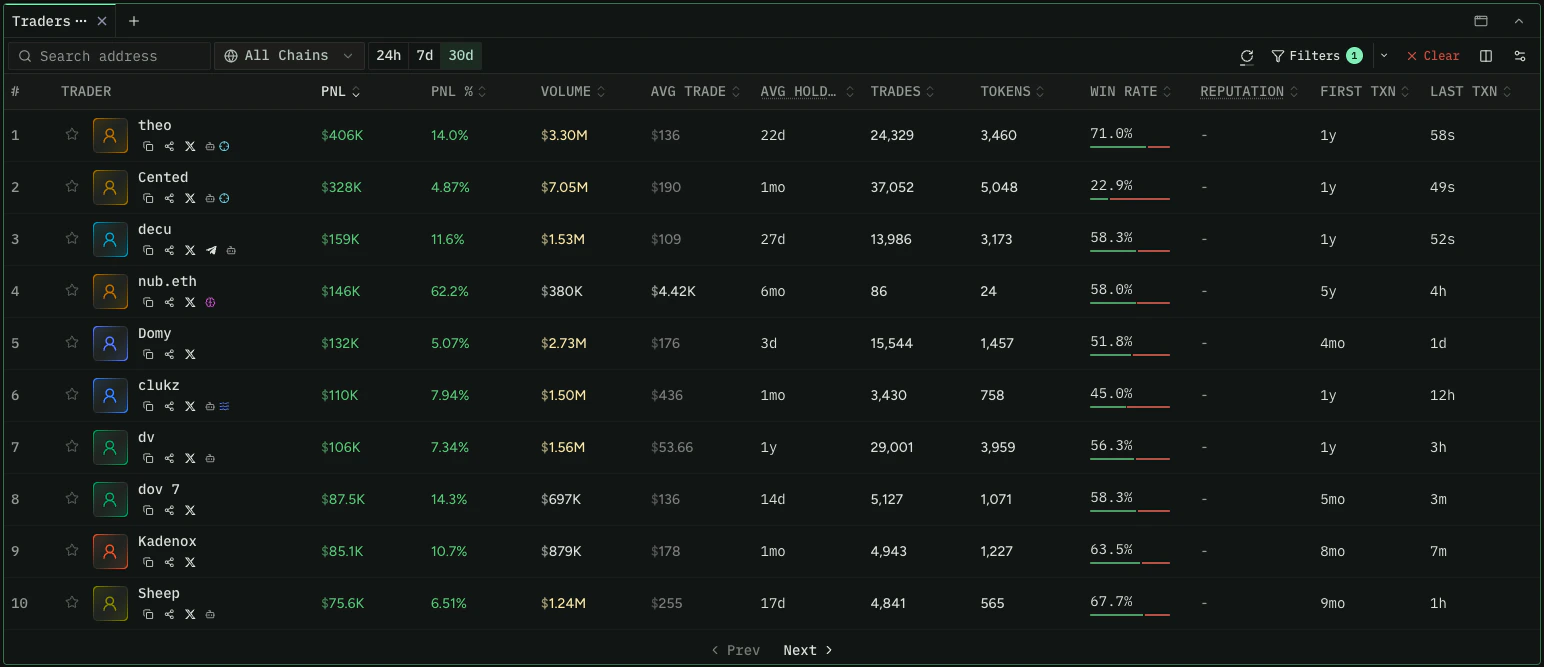
In this recipe we'll show you how to filter for high-performing wallets, rank them by
the metrics that matter to you, and narrow results by identity, socials, and labels.
This data powers the trader discovery experience on [re.defined.fi](https://re.defined.fi):
 Wallet timeframes (such as PnL and volume windows) are rolling periods. 1D is the last
24 hours, 1W is the last 7 days, and so on. They do not start at a fixed date or time
of day.
## Filter by Performance
Use `filterWallets` to surface wallets with strong trading performance. Combine numeric
filters with a ranking to sort the results.
All performance metrics are available across four windows: `1d`, `1w`, `30d`, `1y`.
Append the window to the metric name (for example `realizedProfitUsd30d`, `winRate1w`,
`volumeUsd1y`).
[Test this query in the Explorer →](/explore)
```graphql theme={null} theme={null}
{
filterWallets(input: {
filters: { realizedProfitUsd30d: { gte: 10000 } }
rankings: [{ attribute: realizedProfitUsd30d, direction: DESC }]
limit: 10
}) {
count
results {
address
wallet {
displayName
ethosScore
twitterUsername
}
}
}
}
```
For a trade to count toward win rate, profit or loss must exceed \$1 USD. `volumeUsd`
only counts volume from tokens with a reliable USD price. Use `volumeUsdAll` to include
volume from tokens without one.
## Filter by Identity and Socials
Narrow discovery to wallets that have linked social accounts or a set display name.
This is useful for surfacing public, identifiable traders rather than anonymous
addresses.
All identity filters accept `true` (must have) or `false` (must not have):
| Filter | What it checks |
| ---------------- | ------------------------------------- |
| `hasTwitter` | Wallet has a linked Twitter/X account |
| `hasDiscord` | Wallet has a linked Discord account |
| `hasTelegram` | Wallet has a linked Telegram account |
| `hasFarcaster` | Wallet has a linked Farcaster account |
| `hasGithub` | Wallet has a linked GitHub account |
| `hasDisplayName` | Wallet has a display name set |
| `hasSocials` | Wallet has any linked social account |
[Test this query in the Explorer →](/explore)
```graphql theme={null} theme={null}
{
filterWallets(input: {
filters: {
hasTwitter: true
hasDisplayName: true
}
rankings: [{ attribute: ethosScore, direction: DESC }]
limit: 10
}) {
count
results {
address
wallet {
displayName
ethosScore
twitterUsername
}
}
}
}
```
## Sort by Ethos Credibility
`ethosScore` (0 to 2800) is a credibility score you can use as a ranking attribute to
surface reputable traders first. Combine it with identity filters to focus on wallets
with both a public identity and a strong reputation.
[Test this query in the Explorer →](/explore)
```graphql theme={null} theme={null}
{
filterWallets(input: {
filters: { hasSocials: true }
rankings: [{ attribute: ethosScore, direction: DESC }]
limit: 10
}) {
count
results {
address
wallet {
ethosScore
ethosLevel
displayName
}
}
}
}
```
## Sort and Filter by Average Hold Period
`avgHoldPeriodSec` estimates how long a trader tends to hold tokens, derived from their
buy and sell rate over a window. It is available in four windows (`1d`, `1w`, `30d`,
`1y`) and can be used as either a ranking attribute or a filter input.
**Long-term conviction holders** (longest hold period first):
[Test this query in the Explorer →](/explore)
```graphql theme={null} theme={null}
{
filterWallets(input: {
filters: { volumeUsd30d: { gte: 50000 } }
rankings: [{ attribute: avgHoldPeriodSec30d, direction: DESC }]
limit: 10
}) {
count
results {
address
wallet { displayName }
}
}
}
```
**Quick flippers** (shortest hold period first), filtered to active traders:
[Test this query in the Explorer →](/explore)
```graphql theme={null} theme={null}
{
filterWallets(input: {
filters: { volumeUsd30d: { gte: 50000 } }
rankings: [{ attribute: avgHoldPeriodSec1d, direction: ASC }]
limit: 10
}) {
count
results {
address
wallet { displayName }
}
}
}
```
**Hold period as a filter** (traders that hold positions for more than 24 hours,
sorted by profit). 86400 seconds = 24 hours:
[Test this query in the Explorer →](/explore)
```graphql theme={null} theme={null}
{
filterWallets(input: {
filters: { avgHoldPeriodSec30d: { gt: 86400 } }
rankings: [{ attribute: realizedProfitUsd30d, direction: DESC }]
limit: 10
}) {
count
results {
address
wallet { displayName }
}
}
}
```
Hold period is most useful displayed alongside other stats on a single trader's
profile. See the [Trader Dashboard](/recipes/wallets/trader-dashboard) recipe for
showing it on one wallet.
## Find Token-Specific Traders
To find profitable traders of a specific token, use `filterTokenWallets`. Watch for
wallets that appear across multiple token queries, which can indicate consistent
performance.
[Test this query in the Explorer →](/explore)
```graphql theme={null} theme={null}
{
filterTokenWallets(input: {
tokenIds: ["0xTOKEN_ADDRESS:NETWORK_ID"]
rankings: [{ attribute: realizedProfitUsd30d, direction: DESC }]
limit: 10
}) {
count
results {
walletAddress
tokenBalance
tokenBalanceLive
purchasedTokenBalance
}
}
}
```
`filterTokenWallets` accepts up to 50 token IDs per query. If you pass more than one
token ID, you must also include at least one wallet address. Records only update on
swaps, so wallets that received tokens via transfer (airdrops, direct sends) will not
appear. Use [`holders`](/api-reference/queries/holders) if you need an accurate holder
list updated on every transfer.
`tokenBalance` reflects the wallet's balance as of its last swap, while
`tokenBalanceLive` is the most up-to-date balance — prefer `tokenBalanceLive` when you
need a wallet's current holding.
To narrow results to wallets that still hold the token, filter for a `tokenBalance`
greater than 0. This surfaces current holders rather than everyone who has ever traded
it, and can return more relevant records in a single request.
## Filter by Wallet Labels
Codex surfaces two separate label systems. They come from different sources and may
overlap on individual wallets, so treat them as distinct.
Wallet timeframes (such as PnL and volume windows) are rolling periods. 1D is the last
24 hours, 1W is the last 7 days, and so on. They do not start at a fixed date or time
of day.
## Filter by Performance
Use `filterWallets` to surface wallets with strong trading performance. Combine numeric
filters with a ranking to sort the results.
All performance metrics are available across four windows: `1d`, `1w`, `30d`, `1y`.
Append the window to the metric name (for example `realizedProfitUsd30d`, `winRate1w`,
`volumeUsd1y`).
[Test this query in the Explorer →](/explore)
```graphql theme={null} theme={null}
{
filterWallets(input: {
filters: { realizedProfitUsd30d: { gte: 10000 } }
rankings: [{ attribute: realizedProfitUsd30d, direction: DESC }]
limit: 10
}) {
count
results {
address
wallet {
displayName
ethosScore
twitterUsername
}
}
}
}
```
For a trade to count toward win rate, profit or loss must exceed \$1 USD. `volumeUsd`
only counts volume from tokens with a reliable USD price. Use `volumeUsdAll` to include
volume from tokens without one.
## Filter by Identity and Socials
Narrow discovery to wallets that have linked social accounts or a set display name.
This is useful for surfacing public, identifiable traders rather than anonymous
addresses.
All identity filters accept `true` (must have) or `false` (must not have):
| Filter | What it checks |
| ---------------- | ------------------------------------- |
| `hasTwitter` | Wallet has a linked Twitter/X account |
| `hasDiscord` | Wallet has a linked Discord account |
| `hasTelegram` | Wallet has a linked Telegram account |
| `hasFarcaster` | Wallet has a linked Farcaster account |
| `hasGithub` | Wallet has a linked GitHub account |
| `hasDisplayName` | Wallet has a display name set |
| `hasSocials` | Wallet has any linked social account |
[Test this query in the Explorer →](/explore)
```graphql theme={null} theme={null}
{
filterWallets(input: {
filters: {
hasTwitter: true
hasDisplayName: true
}
rankings: [{ attribute: ethosScore, direction: DESC }]
limit: 10
}) {
count
results {
address
wallet {
displayName
ethosScore
twitterUsername
}
}
}
}
```
## Sort by Ethos Credibility
`ethosScore` (0 to 2800) is a credibility score you can use as a ranking attribute to
surface reputable traders first. Combine it with identity filters to focus on wallets
with both a public identity and a strong reputation.
[Test this query in the Explorer →](/explore)
```graphql theme={null} theme={null}
{
filterWallets(input: {
filters: { hasSocials: true }
rankings: [{ attribute: ethosScore, direction: DESC }]
limit: 10
}) {
count
results {
address
wallet {
ethosScore
ethosLevel
displayName
}
}
}
}
```
## Sort and Filter by Average Hold Period
`avgHoldPeriodSec` estimates how long a trader tends to hold tokens, derived from their
buy and sell rate over a window. It is available in four windows (`1d`, `1w`, `30d`,
`1y`) and can be used as either a ranking attribute or a filter input.
**Long-term conviction holders** (longest hold period first):
[Test this query in the Explorer →](/explore)
```graphql theme={null} theme={null}
{
filterWallets(input: {
filters: { volumeUsd30d: { gte: 50000 } }
rankings: [{ attribute: avgHoldPeriodSec30d, direction: DESC }]
limit: 10
}) {
count
results {
address
wallet { displayName }
}
}
}
```
**Quick flippers** (shortest hold period first), filtered to active traders:
[Test this query in the Explorer →](/explore)
```graphql theme={null} theme={null}
{
filterWallets(input: {
filters: { volumeUsd30d: { gte: 50000 } }
rankings: [{ attribute: avgHoldPeriodSec1d, direction: ASC }]
limit: 10
}) {
count
results {
address
wallet { displayName }
}
}
}
```
**Hold period as a filter** (traders that hold positions for more than 24 hours,
sorted by profit). 86400 seconds = 24 hours:
[Test this query in the Explorer →](/explore)
```graphql theme={null} theme={null}
{
filterWallets(input: {
filters: { avgHoldPeriodSec30d: { gt: 86400 } }
rankings: [{ attribute: realizedProfitUsd30d, direction: DESC }]
limit: 10
}) {
count
results {
address
wallet { displayName }
}
}
}
```
Hold period is most useful displayed alongside other stats on a single trader's
profile. See the [Trader Dashboard](/recipes/wallets/trader-dashboard) recipe for
showing it on one wallet.
## Find Token-Specific Traders
To find profitable traders of a specific token, use `filterTokenWallets`. Watch for
wallets that appear across multiple token queries, which can indicate consistent
performance.
[Test this query in the Explorer →](/explore)
```graphql theme={null} theme={null}
{
filterTokenWallets(input: {
tokenIds: ["0xTOKEN_ADDRESS:NETWORK_ID"]
rankings: [{ attribute: realizedProfitUsd30d, direction: DESC }]
limit: 10
}) {
count
results {
walletAddress
tokenBalance
tokenBalanceLive
purchasedTokenBalance
}
}
}
```
`filterTokenWallets` accepts up to 50 token IDs per query. If you pass more than one
token ID, you must also include at least one wallet address. Records only update on
swaps, so wallets that received tokens via transfer (airdrops, direct sends) will not
appear. Use [`holders`](/api-reference/queries/holders) if you need an accurate holder
list updated on every transfer.
`tokenBalance` reflects the wallet's balance as of its last swap, while
`tokenBalanceLive` is the most up-to-date balance — prefer `tokenBalanceLive` when you
need a wallet's current holding.
To narrow results to wallets that still hold the token, filter for a `tokenBalance`
greater than 0. This surfaces current holders rather than everyone who has ever traded
it, and can return more relevant records in a single request.
## Filter by Wallet Labels
Codex surfaces two separate label systems. They come from different sources and may
overlap on individual wallets, so treat them as distinct.
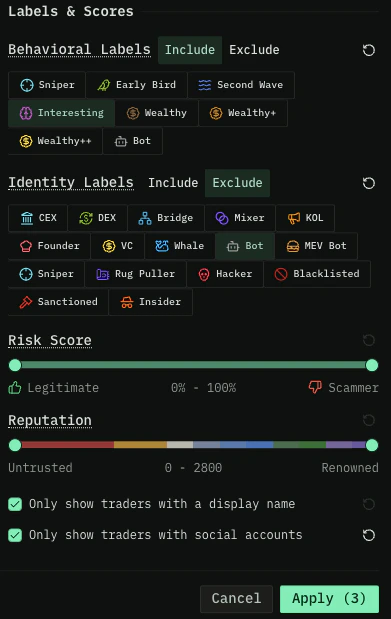 ### Codex behavioral labels
These are assigned by Codex based on a wallet's on-chain trading activity. Apply them
through `includeLabels` (only wallets matching) or `excludeLabels` (wallets to remove)
on `filterWallets`. The `WalletLabel` enum values:
* **`INTERESTING`** — Wallet is interesting based on a number of factors
* **`MEDIUM_WEALTHY`** — Wallet holds \$5M+ in assets
* **`MEGA_WEALTHY`** — Wallet holds \$10M+ in assets
* **`SMART_TRADER_TOKENS_OVER_TWO_DAYS_OLD`** — Over \$7.5K profit in the last 90 days from tokens older than 2 days
* **`SMART_TRADER_TOKENS_UNDER_TWO_DAYS_OLD`** — Over \$5K profit in the last 90 days from tokens between 1 hour and 2 days old
* **`SNIPER`** — Over \$3K profit in the last 90 days from tokens launched within their first hour
* **`WEALTHY`** — Wallet holds \$1M+ in assets
See the [WalletLabel enum reference](/api-reference/enums/walletlabel) for the complete
list (including bot and scammer values used to filter low-quality wallets out of
results).
[Test this query in the Explorer →](/explore)
```graphql theme={null} theme={null}
{
filterWallets(input: {
filters: {
includeLabels: [SMART_TRADER_TOKENS_OVER_TWO_DAYS_OLD]
}
rankings: [{ attribute: realizedProfitUsd30d, direction: DESC }]
limit: 10
}) {
count
results {
address
labels
wallet { displayName }
}
}
}
```
### Identity labels
Codex also surfaces a separate set of curated identity labels from third-party data.
These describe what the wallet is (CEX, KOL, founder, whale) rather than how it
trades. They appear on the `wallet.identityLabels` array, and the full current
vocabulary is returned by the [`walletLabelTypes`](/api-reference/queries/walletlabeltypes)
query. See the reference page for the complete list with display names and
descriptions.
Three labels appear conceptually in both systems: `SNIPER`, `BOT`, and `SCAMMER`. They
are curated separately (Codex on-chain analysis vs. third-party sources) and may flag
overlapping but not identical sets of wallets. A wallet may carry the behavioral
`SNIPER` label without the identity `SNIPER` label, or vice versa.
### Wallet category
Distinct from both label systems, `wallet.category` returns a single structural
classification of what kind of address a wallet is — for example `NORMIE`,
`TOKEN_CREATOR`, `EXCHANGE`, `PAIR`, or `POOL_AUTHORITY`. Where labels describe how a
wallet trades or who it is, `category` answers "what kind of address is this." See the
[WalletCategory enum reference](/api-reference/enums/walletcategory) for the full set of
values.
## Related Endpoints
* [filterWallets](/api-reference/queries/filterwallets)
* [filterTokenWallets](/api-reference/queries/filtertokenwallets)
* [walletLabelTypes](/api-reference/queries/walletlabeltypes)
* [holders](/api-reference/queries/holders)
* [WalletLabel enum reference](/api-reference/enums/walletlabel)
* [WalletCategory enum reference](/api-reference/enums/walletcategory)
Ready to dig into a single wallet? Continue to the
[Trader Dashboard](/recipes/wallets/trader-dashboard) recipe.
### Codex behavioral labels
These are assigned by Codex based on a wallet's on-chain trading activity. Apply them
through `includeLabels` (only wallets matching) or `excludeLabels` (wallets to remove)
on `filterWallets`. The `WalletLabel` enum values:
* **`INTERESTING`** — Wallet is interesting based on a number of factors
* **`MEDIUM_WEALTHY`** — Wallet holds \$5M+ in assets
* **`MEGA_WEALTHY`** — Wallet holds \$10M+ in assets
* **`SMART_TRADER_TOKENS_OVER_TWO_DAYS_OLD`** — Over \$7.5K profit in the last 90 days from tokens older than 2 days
* **`SMART_TRADER_TOKENS_UNDER_TWO_DAYS_OLD`** — Over \$5K profit in the last 90 days from tokens between 1 hour and 2 days old
* **`SNIPER`** — Over \$3K profit in the last 90 days from tokens launched within their first hour
* **`WEALTHY`** — Wallet holds \$1M+ in assets
See the [WalletLabel enum reference](/api-reference/enums/walletlabel) for the complete
list (including bot and scammer values used to filter low-quality wallets out of
results).
[Test this query in the Explorer →](/explore)
```graphql theme={null} theme={null}
{
filterWallets(input: {
filters: {
includeLabels: [SMART_TRADER_TOKENS_OVER_TWO_DAYS_OLD]
}
rankings: [{ attribute: realizedProfitUsd30d, direction: DESC }]
limit: 10
}) {
count
results {
address
labels
wallet { displayName }
}
}
}
```
### Identity labels
Codex also surfaces a separate set of curated identity labels from third-party data.
These describe what the wallet is (CEX, KOL, founder, whale) rather than how it
trades. They appear on the `wallet.identityLabels` array, and the full current
vocabulary is returned by the [`walletLabelTypes`](/api-reference/queries/walletlabeltypes)
query. See the reference page for the complete list with display names and
descriptions.
Three labels appear conceptually in both systems: `SNIPER`, `BOT`, and `SCAMMER`. They
are curated separately (Codex on-chain analysis vs. third-party sources) and may flag
overlapping but not identical sets of wallets. A wallet may carry the behavioral
`SNIPER` label without the identity `SNIPER` label, or vice versa.
### Wallet category
Distinct from both label systems, `wallet.category` returns a single structural
classification of what kind of address a wallet is — for example `NORMIE`,
`TOKEN_CREATOR`, `EXCHANGE`, `PAIR`, or `POOL_AUTHORITY`. Where labels describe how a
wallet trades or who it is, `category` answers "what kind of address is this." See the
[WalletCategory enum reference](/api-reference/enums/walletcategory) for the full set of
values.
## Related Endpoints
* [filterWallets](/api-reference/queries/filterwallets)
* [filterTokenWallets](/api-reference/queries/filtertokenwallets)
* [walletLabelTypes](/api-reference/queries/walletlabeltypes)
* [holders](/api-reference/queries/holders)
* [WalletLabel enum reference](/api-reference/enums/walletlabel)
* [WalletCategory enum reference](/api-reference/enums/walletcategory)
Ready to dig into a single wallet? Continue to the
[Trader Dashboard](/recipes/wallets/trader-dashboard) recipe.