> ## Documentation Index
> Fetch the complete documentation index at: https://docs.codex.io/llms.txt
> Use this file to discover all available pages before exploring further.
# Events
> Learn how to get a list of token events
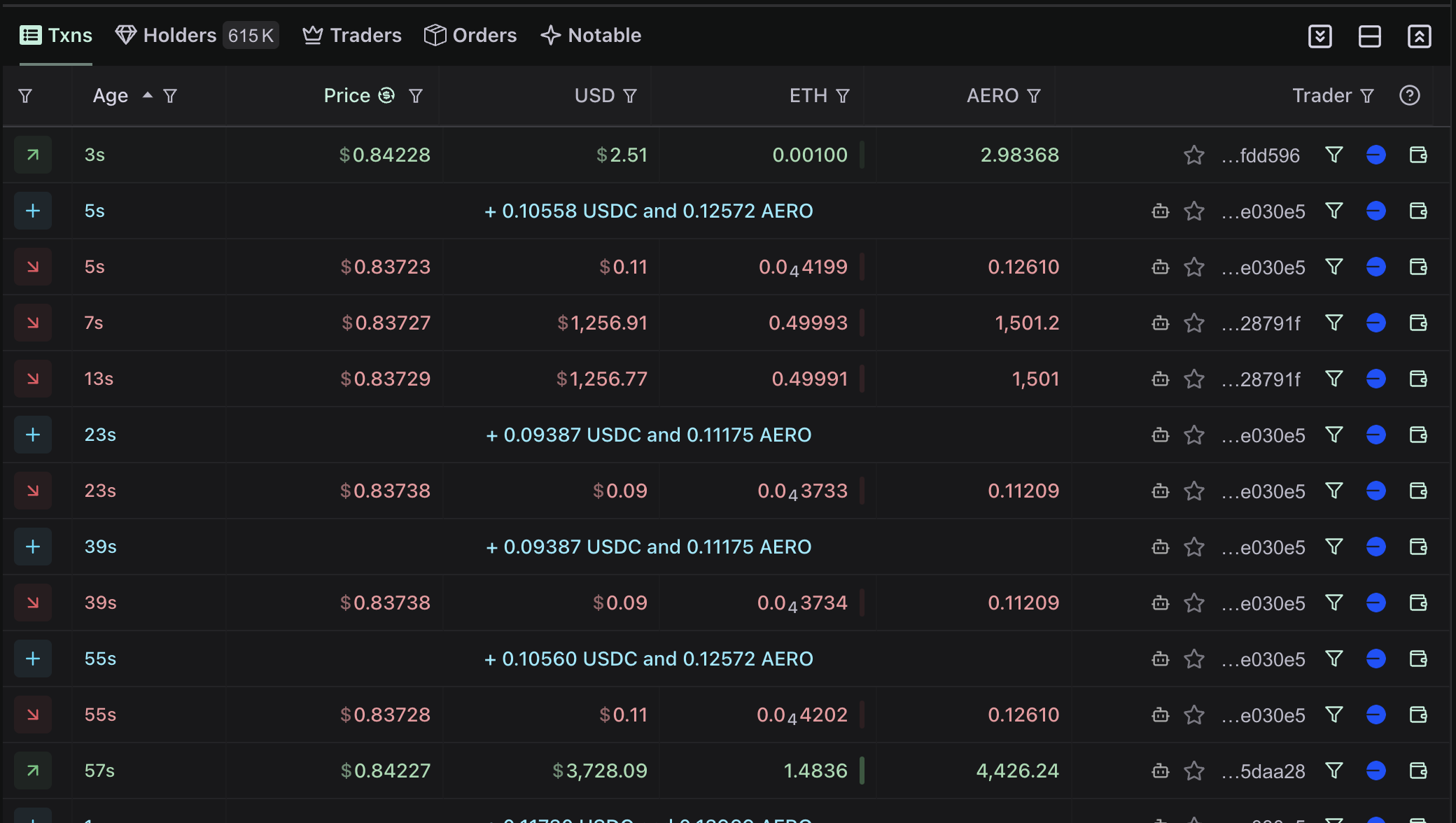
In this recipe we'll show you how to use the Codex api to fetch a list of swaps for a token, complete with filtering, sorting, and realtime updates.
This data powers the transactions tables view on [Defined.fi](https://www.defined.fi/base/0x6cdcb1c4a4d1c3c6d054b27ac5b77e89eafb971d?quoteToken=token1).
 ## Queries
To get a list of swaps for a token, you can use the [`getTokenEvents`](/api-reference/queries/gettokenevents) query.
For example, for the WBNB token on the BNB chain (networkId 56), you can use the following query:
[Test this query in the Explorer →](/explore)
```graphql theme={null} theme={null}
query Events {
getTokenEvents(
query: {
address: "0xbb4cdb9cbd36b01bd1cbaebf2de08d9173bc095c"
networkId: 56
}
) {
items {
id
token0Address
token1Address
token0SwapValueUsd
token1SwapValueUsd
transactionHash
}
}
}
```
To get more (paginate), you can use the `cursor` argument to get the next page of results.
Modify the query to include the cursor like this:
[Test this query in the Explorer →](/explore)
```graphql theme={null} theme={null}
query PaginatedEvents {
getTokenEvents(
cursor: "eyJpdiI6ImNhYmI1Y2UzMmUyYjRmYzRhOGU4NWM5Njc1NzFjZGEzIiwiY29udGVudCI6ImU4ZGNiNTI3YTRiZDJmYTRlNDNjNzE0ZTM3MGU1MDdjZjE5YjhiNTM4ZWE0NjUxM2MxMzlmYjA0OTQ4YTZjNTA1MmVmM2M1ZTdiNTNhOWIyZDczY2Q2NjYxYjM2MTllZTQ1ZDE2ZTJkMDJmYjllZTU2N2YwOTQ3OWNhYmY1NzRjZDNhZTJlM2IwMDQ3ZjZkZGQzODE1Mzk0YTNkMWExMzBiZTNkZTQ4MGUyOWQyNjRiYmFlNjMwMjQ1NzgwOGFhM2RhZDU1YmY0ZjNhZGFlNWYyNDM2NGJhMjY1OWZlZjI0MzQifQ=="
query: {
address: "0xbb4cdb9cbd36b01bd1cbaebf2de08d9173bc095c"
networkId: 56
}
) {
cursor
items {
id
token0Address
token1Address
token0SwapValueUsd
token1SwapValueUsd
transactionHash
timestamp
blockNumber
}
}
}
```
Now you know how to use a paginated cursor to fetch more results.
This pattern is used in many places in the Codex API, see [`getTokenEventsForMaker`](/api-reference/queries/gettokeneventsformaker), [holders](/api-reference/queries/holders) for an example.
## Realtime Updates
To get realtime updates, you can use the [`onTokenEventsCreated`](/api-reference/subscriptions/ontokeneventscreated) subscription.
[Test this query in the Explorer →](/explore)
```graphql theme={null} theme={null}
subscription TokenEventsCreated {
onTokenEventsCreated(
input: {
tokenAddress: "0xbb4cdb9cbd36b01bd1cbaebf2de08d9173bc095c"
networkId: 56
}
) {
events {
id
token0Address
token1Address
token0SwapValueUsd
token1SwapValueUsd
transactionHash
timestamp
blockNumber
}
}
}
```
## Queries
To get a list of swaps for a token, you can use the [`getTokenEvents`](/api-reference/queries/gettokenevents) query.
For example, for the WBNB token on the BNB chain (networkId 56), you can use the following query:
[Test this query in the Explorer →](/explore)
```graphql theme={null} theme={null}
query Events {
getTokenEvents(
query: {
address: "0xbb4cdb9cbd36b01bd1cbaebf2de08d9173bc095c"
networkId: 56
}
) {
items {
id
token0Address
token1Address
token0SwapValueUsd
token1SwapValueUsd
transactionHash
}
}
}
```
To get more (paginate), you can use the `cursor` argument to get the next page of results.
Modify the query to include the cursor like this:
[Test this query in the Explorer →](/explore)
```graphql theme={null} theme={null}
query PaginatedEvents {
getTokenEvents(
cursor: "eyJpdiI6ImNhYmI1Y2UzMmUyYjRmYzRhOGU4NWM5Njc1NzFjZGEzIiwiY29udGVudCI6ImU4ZGNiNTI3YTRiZDJmYTRlNDNjNzE0ZTM3MGU1MDdjZjE5YjhiNTM4ZWE0NjUxM2MxMzlmYjA0OTQ4YTZjNTA1MmVmM2M1ZTdiNTNhOWIyZDczY2Q2NjYxYjM2MTllZTQ1ZDE2ZTJkMDJmYjllZTU2N2YwOTQ3OWNhYmY1NzRjZDNhZTJlM2IwMDQ3ZjZkZGQzODE1Mzk0YTNkMWExMzBiZTNkZTQ4MGUyOWQyNjRiYmFlNjMwMjQ1NzgwOGFhM2RhZDU1YmY0ZjNhZGFlNWYyNDM2NGJhMjY1OWZlZjI0MzQifQ=="
query: {
address: "0xbb4cdb9cbd36b01bd1cbaebf2de08d9173bc095c"
networkId: 56
}
) {
cursor
items {
id
token0Address
token1Address
token0SwapValueUsd
token1SwapValueUsd
transactionHash
timestamp
blockNumber
}
}
}
```
Now you know how to use a paginated cursor to fetch more results.
This pattern is used in many places in the Codex API, see [`getTokenEventsForMaker`](/api-reference/queries/gettokeneventsformaker), [holders](/api-reference/queries/holders) for an example.
## Realtime Updates
To get realtime updates, you can use the [`onTokenEventsCreated`](/api-reference/subscriptions/ontokeneventscreated) subscription.
[Test this query in the Explorer →](/explore)
```graphql theme={null} theme={null}
subscription TokenEventsCreated {
onTokenEventsCreated(
input: {
tokenAddress: "0xbb4cdb9cbd36b01bd1cbaebf2de08d9173bc095c"
networkId: 56
}
) {
events {
id
token0Address
token1Address
token0SwapValueUsd
token1SwapValueUsd
transactionHash
timestamp
blockNumber
}
}
}
```
Now you've got all you need to build a fully functional swap list view.
See more event queries in the [api reference](/api-reference/queries), like [getTokenEventsForMaker](/api-reference/queries/gettokeneventsformaker), [getEventLabels](/api-reference/queries/geteventlabels) for an example.
And more subscriptions like
- [getTokenEvents](/api-reference/queries/gettokenevents)
- [onTokenEventsCreated](/api-reference/subscriptions/ontokeneventscreated)
- [onEventsCreatedByMaker](/api-reference/subscriptions/oneventscreatedbymaker)
- [onEventsCreated](/api-reference/subscriptions/oneventscreated)
- [onUnconfirmedEventsCreated](/api-reference/subscriptions/onunconfirmedeventscreated)
- [onUnconfirmedEventsCreatedByMaker](/api-reference/subscriptions/onunconfirmedeventscreatedbymaker)