> ## Documentation Index
> Fetch the complete documentation index at: https://docs.codex.io/llms.txt
> Use this file to discover all available pages before exploring further.
# Detailed Token Page
> Learn how to build a comprehensive token detail page with price, holders, safety, trades, and real-time updates
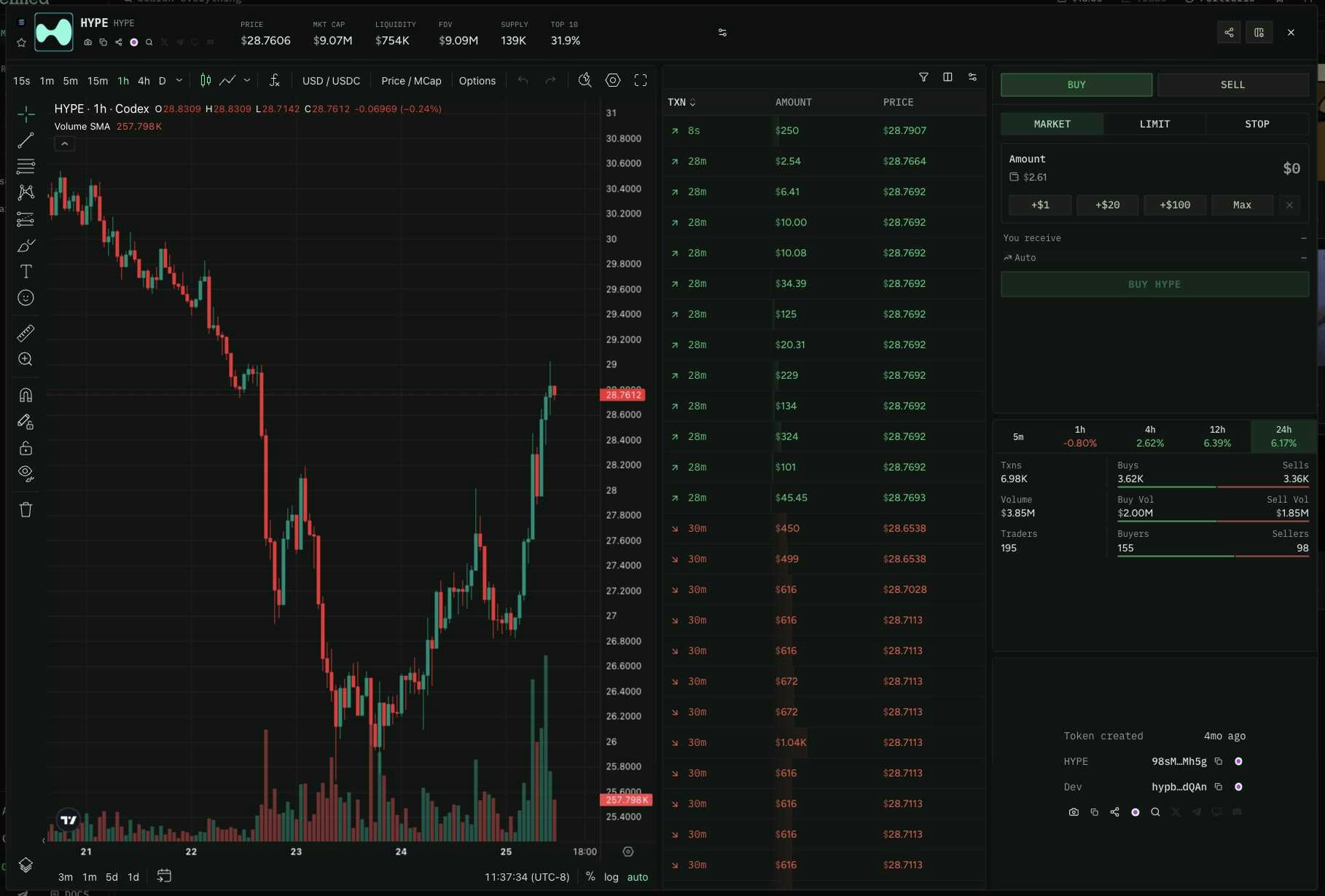
In this recipe we'll walk through building a token detail page — the kind of page your users land on after clicking a token from a discovery feed. We'll combine multiple Codex endpoints to populate every section: metadata, price, holders, top traders, safety signals, trade history, and real-time updates.
This data powers the token pages on [Defined.fi](https://www.defined.fi/sol/9wK8yN6iz1ie5kEJkvZCTxyN1x5sTdNfx8yeMY8Ebonk?utm_source=codex\&utm_medium=docs\&utm_campaign=recipes-token-dashboard):
 ## Step 1: Token Metadata & Safety
Start by fetching the token's core info — name, symbol, images, social links, and safety signals. This single query gives you everything for the header of your token page.
[Test this query in the Explorer →](/explore)
```graphql theme={null} theme={null}
query TokenMetadata {
token(
input: {
address: "9wK8yN6iz1ie5kEJkvZCTxyN1x5sTdNfx8yeMY8Ebonk"
networkId: 1399811149
}
) {
name
symbol
decimals
address
networkId
isScam
creatorAddress
creator {
address
displayName
category
identityLabels
tokensCreatedCount
tokensMigratedCount
}
createdAt
mintable
freezable
socialLinks {
twitter
telegram
discord
website
}
top10HoldersPercent
info {
circulatingSupply
totalSupply
imageSmallUrl
imageLargeUrl
description
}
launchpad {
launchpadName
graduationPercent
poolAddress
completed
migrated
migratedAt
migratedPoolAddress
}
}
}
```
**Token verification:** Codex uses `isScam` rather than `isVerified` for token safety. `isScam: false` is the equivalent of a token being "verified." For Solana tokens, also check `mintable` and `freezable` — if these return an address, the token's supply can be increased or holdings can be frozen.
**Screen for suspicious-wallet concentration.** Alongside `isScam`, Codex reports how much of a token's supply sits in risky wallet cohorts. [`filterTokens`](/api-reference/queries/filtertokens) exposes `suspiciousHeldPercentage` and `suspiciousCount` — the deduplicated union of snipers, bundlers, and insiders — plus the per-cohort `sniperHeldPercentage`, `bundlerHeldPercentage`, `insiderHeldPercentage`, and `devHeldPercentage`. These are available as result fields, filter inputs, and ranking attributes, so you can both display them and screen risky tokens out at discovery time. For launchpad tokens, the same breakdown is available inline on [`pairMetadata`](/api-reference/queries/pairmetadata) via `walletActivity` (shown in Step 2).
**Resolve the creator inline.** Alongside the raw `creatorAddress`, `EnhancedToken` exposes `creator`, a fully resolved [`Wallet`](/api-reference/types/wallet). Select it to pull the creator's display name, identity labels, [category](/api-reference/enums/walletcategory), and `tokensCreatedCount` / `tokensMigratedCount` in the same call — a useful trust signal (e.g. a serial deployer) without a follow-up query.
## Step 2: Price & Pair Data
Fetch the token's current price, volume, and liquidity from its top trading pair using `pairMetadata`. This gives you the price stats panel for your dashboard.
[Test this query in the Explorer →](/explore)
```graphql theme={null} theme={null}
query TokenPrice {
pairMetadata(
pairId: "7GtLUbEStB1xjqVcGHqpAo4hW8uFNbLKDMcoHb7QSEXY:1399811149"
) {
price
liquidity
volume5m
volume1
volume4
volume12
volume24
priceChange5m
priceChange1
priceChange4
priceChange12
priceChange24
highPrice24
lowPrice24
enhancedToken0 {
name
symbol
isScam
}
enhancedToken1 {
name
symbol
isScam
}
walletActivity {
suspiciousCount
suspiciousHeldPercentage
sniperHeldPercentage
bundlerHeldPercentage
insiderHeldPercentage
}
}
}
```
If you don't already have the pair ID, use `listPairsWithMetadataForToken` to find it. Results are sorted by liquidity so the first result is the most active pair.
[Test this query in the Explorer →](/explore)
```graphql theme={null} theme={null}
query FindPair {
listPairsWithMetadataForToken(
tokenAddress: "9wK8yN6iz1ie5kEJkvZCTxyN1x5sTdNfx8yeMY8Ebonk"
networkId: 1399811149
limit: 5
) {
results {
pair {
address
id
token0
token1
fee
protocol
}
backingToken {
address
symbol
}
volume
liquidity
}
}
}
```
Use `enhancedToken0` and `enhancedToken1` to get enriched token metadata directly from the pair query — this saves you an extra call to `token`. The `walletActivity` block returns suspicious-wallet concentration (snipers, bundlers, insiders) and is populated for launchpad tokens — it's `null` for others, where you should read these stats from [`filterTokens`](/api-reference/queries/filtertokens) instead.
## Step 3: Holders & Top Traders
Build the holders tab. Use `holders` for the top holder list and `tokenTopTraders` for the most active traders with PnL data.
[Test this query in the Explorer →](/explore)
```graphql theme={null} theme={null}
query TopHolders {
holders(
input: {
tokenId: "9wK8yN6iz1ie5kEJkvZCTxyN1x5sTdNfx8yeMY8Ebonk:1399811149"
}
) {
count
top10HoldersPercent
items {
address
balance
shiftedBalance
balanceUsd
tokenPriceUsd
}
}
}
```
[Test this query in the Explorer →](/explore)
```graphql theme={null} theme={null}
query TopTraders {
tokenTopTraders(
input: {
tokenAddress: "9wK8yN6iz1ie5kEJkvZCTxyN1x5sTdNfx8yeMY8Ebonk"
networkId: 1399811149
tradingPeriod: WEEK
limit: 20
}
) {
items {
walletAddress
realizedProfitUsd
realizedProfitPercentage
amountBoughtUsd
amountSoldUsd
volumeUsd
buys
sells
tokenBalance
lastTransactionAt
}
}
}
```
## Step 4: Trade History
Show recent buys and sells. Use `getTokenEvents` for the initial load and paginate with `cursor` for older trades.
[Test this query in the Explorer →](/explore)
```graphql theme={null} theme={null}
query RecentTrades {
getTokenEvents(
query: {
address: "9wK8yN6iz1ie5kEJkvZCTxyN1x5sTdNfx8yeMY8Ebonk"
networkId: 1399811149
}
limit: 25
) {
cursor
items {
eventDisplayType
timestamp
maker
token0SwapValueUsd
token1SwapValueUsd
token0Address
token1Address
transactionHash
blockNumber
walletAge
walletLabels
}
}
}
```
[Test this query in the Explorer →](/explore)
```graphql theme={null} theme={null}
query LargeBuys {
getTokenEvents(
query: {
address: "9wK8yN6iz1ie5kEJkvZCTxyN1x5sTdNfx8yeMY8Ebonk"
networkId: 1399811149
eventDisplayType: [Buy]
priceUsdTotal: { gt: 1000 }
}
limit: 25
) {
cursor
items {
eventDisplayType
timestamp
maker
token0SwapValueUsd
token1SwapValueUsd
transactionHash
walletLabels
}
}
}
```
## Step 5: Chart Data
Fetch OHLCV bars for rendering a price chart. See the [Charts recipe](/recipes/charts) for full details on rendering with TradingView.
[Test this query in the Explorer →](/explore)
```graphql theme={null} theme={null}
query TokenChart {
getTokenBars(
symbol: "9wK8yN6iz1ie5kEJkvZCTxyN1x5sTdNfx8yeMY8Ebonk:1399811149"
from: 1740000000
to: 1740604800
resolution: "60"
) {
o
h
l
c
t
volume
}
}
```
## Step 6: Real-Time Updates
Once the page is loaded, open subscriptions to keep it live. Here are the key subscriptions for a token dashboard:
Subscribe to `onPairMetadataUpdated` to keep price, volume, and liquidity current without polling.
[Test this query in the Explorer →](/explore)
```graphql theme={null} theme={null}
subscription LivePrice {
onPairMetadataUpdated(
id: "7GtLUbEStB1xjqVcGHqpAo4hW8uFNbLKDMcoHb7QSEXY:1399811149"
) {
price
liquidity
volume5m
volume1
volume24
priceChange5m
priceChange1
priceChange24
}
}
```
Subscribe to `onTokenEventsCreated` to stream new trades as they happen.
[Test this query in the Explorer →](/explore)
```graphql theme={null} theme={null}
subscription LiveTrades {
onTokenEventsCreated(
input: {
tokenAddress: "9wK8yN6iz1ie5kEJkvZCTxyN1x5sTdNfx8yeMY8Ebonk"
networkId: 1399811149
}
) {
events {
eventDisplayType
timestamp
maker
token0SwapValueUsd
token1SwapValueUsd
transactionHash
walletLabels
}
}
}
```
Subscribe to `onTokenBarsUpdated` to keep the chart updating in real time.
[Test this query in the Explorer →](/explore)
```graphql theme={null} theme={null}
subscription LiveChart {
onTokenBarsUpdated(
tokenId: "9wK8yN6iz1ie5kEJkvZCTxyN1x5sTdNfx8yeMY8Ebonk:1399811149"
) {
aggregates {
r1 {
usd {
o
h
l
c
t
volume
}
}
}
}
}
```
Subscribe to `onHoldersUpdated` to keep the holders list current.
[Test this query in the Explorer →](/explore)
```graphql theme={null} theme={null}
subscription LiveHolders {
onHoldersUpdated(
tokenId: "9wK8yN6iz1ie5kEJkvZCTxyN1x5sTdNfx8yeMY8Ebonk:1399811149"
) {
holders
balances {
address
balance
shiftedBalance
balanceUsd
}
}
}
```
Each subscription uses one connection toward your plan's limit (300 for Growth plans). A single token dashboard page with all four subscriptions above uses 4 connections. Share connections across subscriptions where possible — see [Subscriptions › Multiple Subscriptions](/concepts/subscriptions#multiple-subscriptions) for guidance on how to size each connection.
## Putting It All Together
Here's the recommended data flow for a token dashboard:
**On page load (queries):**
1. `token` — metadata, safety, social links
2. `pairMetadata` — price, volume, liquidity
3. `holders` + `tokenTopTraders` — holder and trader tabs
4. `getTokenEvents` — recent trade history
5. `getTokenBars` — chart OHLCV data
**After load (subscriptions):**
1. `onPairMetadataUpdated` — live price and volume
2. `onTokenEventsCreated` — live trade feed
3. `onTokenBarsUpdated` — live chart updates
4. `onHoldersUpdated` — live holder changes
**Optimizing calls:** You can reduce initial load by running queries 1-5 in parallel — they're all independent. For the subscriptions, open them on a single WebSocket connection to minimize connection usage.
### Subscriptions vs Queries Quick Reference
| Data | Query (historical) | Subscription (real-time) |
| -------------- | -------------------------- | -------------------------------------- |
| Price & volume | `pairMetadata` | `onPairMetadataUpdated` |
| Trades | `getTokenEvents` | `onTokenEventsCreated` |
| Chart bars | `getBars` / `getTokenBars` | `onBarsUpdated` / `onTokenBarsUpdated` |
| Holders | `holders` | `onHoldersUpdated` |
| Token prices | `getTokenPrices` | `onPricesUpdated` |
Check out the related endpoints in their respective pages:
* [token](/api-reference/queries/token)
* [pairMetadata](/api-reference/queries/pairmetadata)
* [listPairsWithMetadataForToken](/api-reference/queries/listpairswithmetadatafortoken)
* [holders](/api-reference/queries/holders)
* [tokenTopTraders](/api-reference/queries/tokentoptraders)
* [getTokenEvents](/api-reference/queries/gettokenevents)
* [getBars](/api-reference/queries/getbars) / [getTokenBars](/api-reference/queries/gettokenbars)
* [onPairMetadataUpdated](/api-reference/subscriptions/onpairmetadataupdated)
* [onTokenEventsCreated](/api-reference/subscriptions/ontokeneventscreated)
* [onTokenBarsUpdated](/api-reference/subscriptions/ontokenbarsupdated)
* [onHoldersUpdated](/api-reference/subscriptions/onholdersupdated)
## Step 1: Token Metadata & Safety
Start by fetching the token's core info — name, symbol, images, social links, and safety signals. This single query gives you everything for the header of your token page.
[Test this query in the Explorer →](/explore)
```graphql theme={null} theme={null}
query TokenMetadata {
token(
input: {
address: "9wK8yN6iz1ie5kEJkvZCTxyN1x5sTdNfx8yeMY8Ebonk"
networkId: 1399811149
}
) {
name
symbol
decimals
address
networkId
isScam
creatorAddress
creator {
address
displayName
category
identityLabels
tokensCreatedCount
tokensMigratedCount
}
createdAt
mintable
freezable
socialLinks {
twitter
telegram
discord
website
}
top10HoldersPercent
info {
circulatingSupply
totalSupply
imageSmallUrl
imageLargeUrl
description
}
launchpad {
launchpadName
graduationPercent
poolAddress
completed
migrated
migratedAt
migratedPoolAddress
}
}
}
```
**Token verification:** Codex uses `isScam` rather than `isVerified` for token safety. `isScam: false` is the equivalent of a token being "verified." For Solana tokens, also check `mintable` and `freezable` — if these return an address, the token's supply can be increased or holdings can be frozen.
**Screen for suspicious-wallet concentration.** Alongside `isScam`, Codex reports how much of a token's supply sits in risky wallet cohorts. [`filterTokens`](/api-reference/queries/filtertokens) exposes `suspiciousHeldPercentage` and `suspiciousCount` — the deduplicated union of snipers, bundlers, and insiders — plus the per-cohort `sniperHeldPercentage`, `bundlerHeldPercentage`, `insiderHeldPercentage`, and `devHeldPercentage`. These are available as result fields, filter inputs, and ranking attributes, so you can both display them and screen risky tokens out at discovery time. For launchpad tokens, the same breakdown is available inline on [`pairMetadata`](/api-reference/queries/pairmetadata) via `walletActivity` (shown in Step 2).
**Resolve the creator inline.** Alongside the raw `creatorAddress`, `EnhancedToken` exposes `creator`, a fully resolved [`Wallet`](/api-reference/types/wallet). Select it to pull the creator's display name, identity labels, [category](/api-reference/enums/walletcategory), and `tokensCreatedCount` / `tokensMigratedCount` in the same call — a useful trust signal (e.g. a serial deployer) without a follow-up query.
## Step 2: Price & Pair Data
Fetch the token's current price, volume, and liquidity from its top trading pair using `pairMetadata`. This gives you the price stats panel for your dashboard.
[Test this query in the Explorer →](/explore)
```graphql theme={null} theme={null}
query TokenPrice {
pairMetadata(
pairId: "7GtLUbEStB1xjqVcGHqpAo4hW8uFNbLKDMcoHb7QSEXY:1399811149"
) {
price
liquidity
volume5m
volume1
volume4
volume12
volume24
priceChange5m
priceChange1
priceChange4
priceChange12
priceChange24
highPrice24
lowPrice24
enhancedToken0 {
name
symbol
isScam
}
enhancedToken1 {
name
symbol
isScam
}
walletActivity {
suspiciousCount
suspiciousHeldPercentage
sniperHeldPercentage
bundlerHeldPercentage
insiderHeldPercentage
}
}
}
```
If you don't already have the pair ID, use `listPairsWithMetadataForToken` to find it. Results are sorted by liquidity so the first result is the most active pair.
[Test this query in the Explorer →](/explore)
```graphql theme={null} theme={null}
query FindPair {
listPairsWithMetadataForToken(
tokenAddress: "9wK8yN6iz1ie5kEJkvZCTxyN1x5sTdNfx8yeMY8Ebonk"
networkId: 1399811149
limit: 5
) {
results {
pair {
address
id
token0
token1
fee
protocol
}
backingToken {
address
symbol
}
volume
liquidity
}
}
}
```
Use `enhancedToken0` and `enhancedToken1` to get enriched token metadata directly from the pair query — this saves you an extra call to `token`. The `walletActivity` block returns suspicious-wallet concentration (snipers, bundlers, insiders) and is populated for launchpad tokens — it's `null` for others, where you should read these stats from [`filterTokens`](/api-reference/queries/filtertokens) instead.
## Step 3: Holders & Top Traders
Build the holders tab. Use `holders` for the top holder list and `tokenTopTraders` for the most active traders with PnL data.
[Test this query in the Explorer →](/explore)
```graphql theme={null} theme={null}
query TopHolders {
holders(
input: {
tokenId: "9wK8yN6iz1ie5kEJkvZCTxyN1x5sTdNfx8yeMY8Ebonk:1399811149"
}
) {
count
top10HoldersPercent
items {
address
balance
shiftedBalance
balanceUsd
tokenPriceUsd
}
}
}
```
[Test this query in the Explorer →](/explore)
```graphql theme={null} theme={null}
query TopTraders {
tokenTopTraders(
input: {
tokenAddress: "9wK8yN6iz1ie5kEJkvZCTxyN1x5sTdNfx8yeMY8Ebonk"
networkId: 1399811149
tradingPeriod: WEEK
limit: 20
}
) {
items {
walletAddress
realizedProfitUsd
realizedProfitPercentage
amountBoughtUsd
amountSoldUsd
volumeUsd
buys
sells
tokenBalance
lastTransactionAt
}
}
}
```
## Step 4: Trade History
Show recent buys and sells. Use `getTokenEvents` for the initial load and paginate with `cursor` for older trades.
[Test this query in the Explorer →](/explore)
```graphql theme={null} theme={null}
query RecentTrades {
getTokenEvents(
query: {
address: "9wK8yN6iz1ie5kEJkvZCTxyN1x5sTdNfx8yeMY8Ebonk"
networkId: 1399811149
}
limit: 25
) {
cursor
items {
eventDisplayType
timestamp
maker
token0SwapValueUsd
token1SwapValueUsd
token0Address
token1Address
transactionHash
blockNumber
walletAge
walletLabels
}
}
}
```
[Test this query in the Explorer →](/explore)
```graphql theme={null} theme={null}
query LargeBuys {
getTokenEvents(
query: {
address: "9wK8yN6iz1ie5kEJkvZCTxyN1x5sTdNfx8yeMY8Ebonk"
networkId: 1399811149
eventDisplayType: [Buy]
priceUsdTotal: { gt: 1000 }
}
limit: 25
) {
cursor
items {
eventDisplayType
timestamp
maker
token0SwapValueUsd
token1SwapValueUsd
transactionHash
walletLabels
}
}
}
```
## Step 5: Chart Data
Fetch OHLCV bars for rendering a price chart. See the [Charts recipe](/recipes/charts) for full details on rendering with TradingView.
[Test this query in the Explorer →](/explore)
```graphql theme={null} theme={null}
query TokenChart {
getTokenBars(
symbol: "9wK8yN6iz1ie5kEJkvZCTxyN1x5sTdNfx8yeMY8Ebonk:1399811149"
from: 1740000000
to: 1740604800
resolution: "60"
) {
o
h
l
c
t
volume
}
}
```
## Step 6: Real-Time Updates
Once the page is loaded, open subscriptions to keep it live. Here are the key subscriptions for a token dashboard:
Subscribe to `onPairMetadataUpdated` to keep price, volume, and liquidity current without polling.
[Test this query in the Explorer →](/explore)
```graphql theme={null} theme={null}
subscription LivePrice {
onPairMetadataUpdated(
id: "7GtLUbEStB1xjqVcGHqpAo4hW8uFNbLKDMcoHb7QSEXY:1399811149"
) {
price
liquidity
volume5m
volume1
volume24
priceChange5m
priceChange1
priceChange24
}
}
```
Subscribe to `onTokenEventsCreated` to stream new trades as they happen.
[Test this query in the Explorer →](/explore)
```graphql theme={null} theme={null}
subscription LiveTrades {
onTokenEventsCreated(
input: {
tokenAddress: "9wK8yN6iz1ie5kEJkvZCTxyN1x5sTdNfx8yeMY8Ebonk"
networkId: 1399811149
}
) {
events {
eventDisplayType
timestamp
maker
token0SwapValueUsd
token1SwapValueUsd
transactionHash
walletLabels
}
}
}
```
Subscribe to `onTokenBarsUpdated` to keep the chart updating in real time.
[Test this query in the Explorer →](/explore)
```graphql theme={null} theme={null}
subscription LiveChart {
onTokenBarsUpdated(
tokenId: "9wK8yN6iz1ie5kEJkvZCTxyN1x5sTdNfx8yeMY8Ebonk:1399811149"
) {
aggregates {
r1 {
usd {
o
h
l
c
t
volume
}
}
}
}
}
```
Subscribe to `onHoldersUpdated` to keep the holders list current.
[Test this query in the Explorer →](/explore)
```graphql theme={null} theme={null}
subscription LiveHolders {
onHoldersUpdated(
tokenId: "9wK8yN6iz1ie5kEJkvZCTxyN1x5sTdNfx8yeMY8Ebonk:1399811149"
) {
holders
balances {
address
balance
shiftedBalance
balanceUsd
}
}
}
```
Each subscription uses one connection toward your plan's limit (300 for Growth plans). A single token dashboard page with all four subscriptions above uses 4 connections. Share connections across subscriptions where possible — see [Subscriptions › Multiple Subscriptions](/concepts/subscriptions#multiple-subscriptions) for guidance on how to size each connection.
## Putting It All Together
Here's the recommended data flow for a token dashboard:
**On page load (queries):**
1. `token` — metadata, safety, social links
2. `pairMetadata` — price, volume, liquidity
3. `holders` + `tokenTopTraders` — holder and trader tabs
4. `getTokenEvents` — recent trade history
5. `getTokenBars` — chart OHLCV data
**After load (subscriptions):**
1. `onPairMetadataUpdated` — live price and volume
2. `onTokenEventsCreated` — live trade feed
3. `onTokenBarsUpdated` — live chart updates
4. `onHoldersUpdated` — live holder changes
**Optimizing calls:** You can reduce initial load by running queries 1-5 in parallel — they're all independent. For the subscriptions, open them on a single WebSocket connection to minimize connection usage.
### Subscriptions vs Queries Quick Reference
| Data | Query (historical) | Subscription (real-time) |
| -------------- | -------------------------- | -------------------------------------- |
| Price & volume | `pairMetadata` | `onPairMetadataUpdated` |
| Trades | `getTokenEvents` | `onTokenEventsCreated` |
| Chart bars | `getBars` / `getTokenBars` | `onBarsUpdated` / `onTokenBarsUpdated` |
| Holders | `holders` | `onHoldersUpdated` |
| Token prices | `getTokenPrices` | `onPricesUpdated` |
Check out the related endpoints in their respective pages:
* [token](/api-reference/queries/token)
* [pairMetadata](/api-reference/queries/pairmetadata)
* [listPairsWithMetadataForToken](/api-reference/queries/listpairswithmetadatafortoken)
* [holders](/api-reference/queries/holders)
* [tokenTopTraders](/api-reference/queries/tokentoptraders)
* [getTokenEvents](/api-reference/queries/gettokenevents)
* [getBars](/api-reference/queries/getbars) / [getTokenBars](/api-reference/queries/gettokenbars)
* [onPairMetadataUpdated](/api-reference/subscriptions/onpairmetadataupdated)
* [onTokenEventsCreated](/api-reference/subscriptions/ontokeneventscreated)
* [onTokenBarsUpdated](/api-reference/subscriptions/ontokenbarsupdated)
* [onHoldersUpdated](/api-reference/subscriptions/onholdersupdated)