> ## Documentation Index
> Fetch the complete documentation index at: https://docs.codex.io/llms.txt
> Use this file to discover all available pages before exploring further.
# Subscriptions
> Real-time data streams via GraphQL subscriptions over WebSockets
export const EmbedFrame = ({query, height, caption}) => {
const encodedQuery = typeof window === "undefined" ? "" : encodeURIComponent(query);
return
;
};
Subscriptions (WebSockets) require a Growth or Enterprise plan. [Learn more](https://dashboard.codex.io/dashboard/billing?utm_source=codex\&utm_medium=docs\&utm_campaign=billing).
## What is a Subscription?
A subscription is a persistent connection that pushes data to you in real-time. Instead of repeatedly polling the API for updates, you open a WebSocket connection and tell Codex what data you want to watch. Whenever that data changes, Codex sends you the update automatically.
**Every message the subscription sends you counts as 1 request** against your plan's monthly limit. For example, if you subscribe to price updates for a token and receive 1,000 updates in an hour, that's 1,000 requests.
Not sure whether to use a query or a subscription? See [Queries vs Subscriptions](/extra/queries-vs-subscriptions) for a side-by-side comparison and endpoint mapping.
## When to Use Subscriptions
* **Live price feeds** — streaming token or pair prices as they change
* **Real-time trade notifications** — watching for new swaps, mints, or burns as they happen
* **Streaming chart updates** — keeping OHLCV bars current without polling
* **Launchpad monitoring** — detecting new token launches and graduation events instantly
* **Live holder/balance tracking** — watching holder counts or wallet balances update in real-time
If you only need data once (e.g. loading a page, fetching historical data, or responding to a user action), use [Queries](/concepts/queries) instead.
## How It Works
Subscriptions use the WebSocket protocol. You open a connection to `wss://graph.codex.io/graphql`, authenticate via the `connection_init` payload, and then send `subscribe` messages for the data you want.
This subscription uses your account's monthly request limit while active. Stop the subscription when you're done testing to conserve your limit.
If you're using the [SDK](/sdk), then you can just call `sdk.subscribe` with the subscription you want to use and it will handle the connections.
```typescript onPriceUpdated theme={null}
sdk.subscribe(gql`
subscription($address: String!, $networkId: Int!) {
onPriceUpdated(address: $address, networkId: $networkId) {
priceUsd
timestamp
address
}
}
`, {
address: "0xbb4cdb9cbd36b01bd1cbaebf2de08d9173bc095c",
networkId: 56,
})
```
We use the `graphql-ws` library to handle websocket connections on the backend, you can learn more about it [ here ](https://github.com/enisdenjo/graphql-ws).
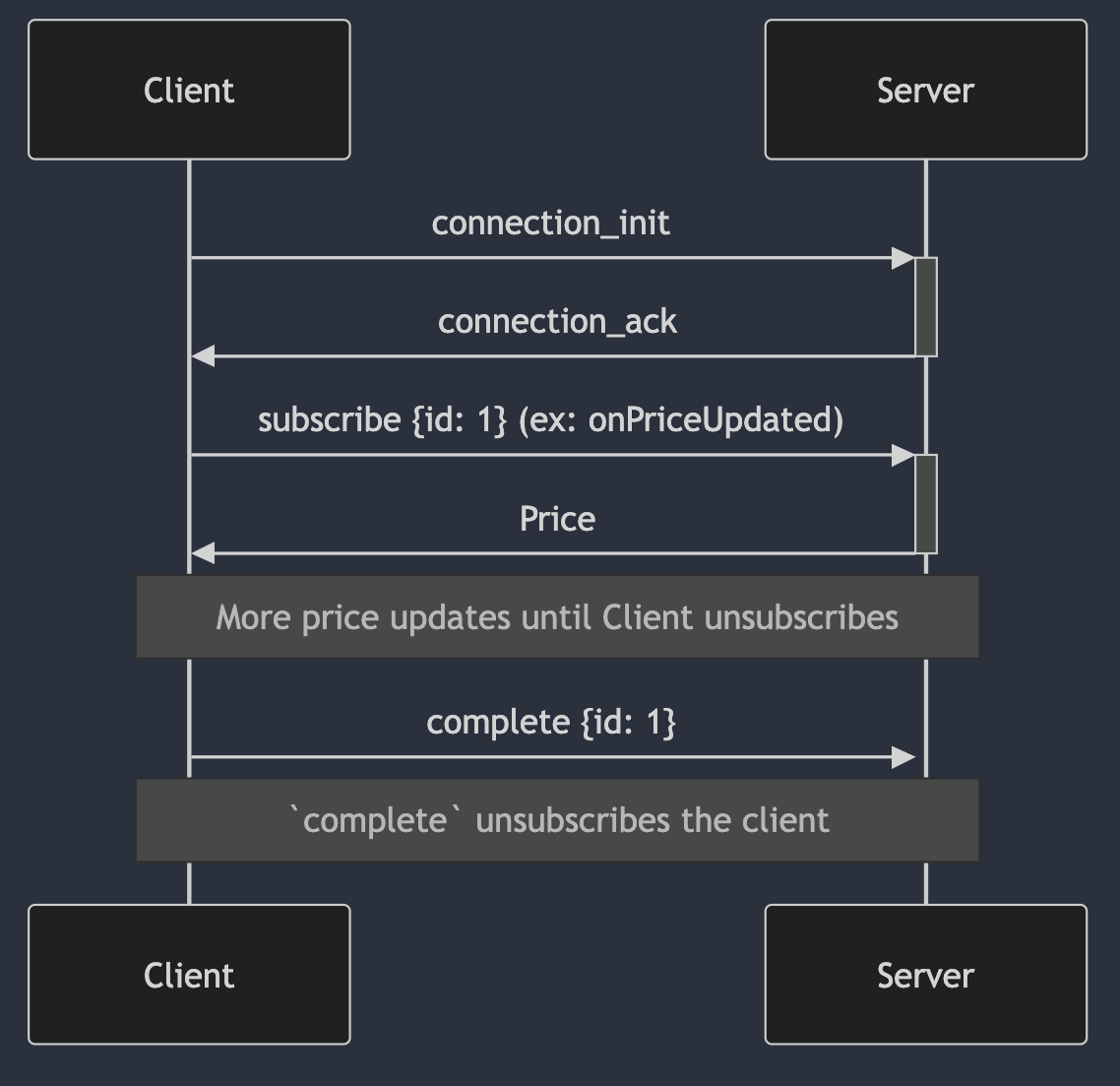 ### Example
```typescript graphql-ws theme={null}
import { createClient } from "graphql-ws";
const client = createClient({
url: "wss://graph.codex.io/graphql",
connectionParams: {
Authorization: apiKey,
},
});
client.subscribe({
query: `
subscription($address: String!, $networkId: Int!) {
onPriceUpdated(address: $address, networkId: $networkId) {
priceUsd
timestamp
address
}
}
`,
variables: {
address: "0xbb4cdb9cbd36b01bd1cbaebf2de08d9173bc095c",
networkId: 56,
},
sink: {
next: (data) => {
console.log(data);
},
error: (error) => {
console.error(error);
},
complete: () => {
console.log("complete");
},
}
})
```
```javascript browser socket theme={null}
const CODEX_API_KEY = "";
const webSocket = new WebSocket(
`wss://graph.codex.io/graphql`,
"graphql-transport-ws"
);
webSocket.onopen = () => {
console.log("opened");
webSocket.send(
JSON.stringify({
"type": "connection_init",
"payload": {
"Authorization": CODEX_API_KEY
}
})
);
};
webSocket.onmessage = (event) => {
const data = JSON.parse(event.data)
if (data.type === "connection_ack") {
webSocket.send(
JSON.stringify(
{
id: "my_id",
type: "subscribe",
payload: {
"variables": {
"address": "0xbb4cdb9cbd36b01bd1cbaebf2de08d9173bc095c",
"networkId": 56
},
"extensions": {},
"operationName": "onPriceUpdated",
"query": `subscription($address: String!, $networkId: Int!) {
onPriceUpdated(address: $address, networkId: $networkId) {
priceUsd
timestamp
address
}
}`
}
}
)
);
} else {
console.log("message", data);
}
};
// You can send the `complete` message to the server to unsubscribe from the subscription.
setTimeout(() => {
webSocket.send(JSON.stringify({
id: "my_id",
type: "complete",
}));
}, 10000); // unsubscribe after 10 seconds for demo purposes
```
You can refer to this [datafeed](https://gist.github.com/bradens/bfe449f8ea88fca8a1952cfe242b5e21) example using the SDK for `onTokenBarsUpdated` to get you started with a chart rendering subscription.
## Multiple Subscriptions
You can subscribe multiple times in the same connection, just send additional `subscribe` messages.
There is no hard limit on subscriptions per connection, but the practical capacity depends less on the number of subscriptions and more on the **total number of tokens being watched** and the message throughput from those tokens. As a starting point, plan for **up to \~100 tokens watched per connection**. If your token set is mostly low-volume, you can pack more onto a single connection. If it includes very active tokens (e.g. SOL, top trending tokens, high-volume pairs), open more connections with fewer tokens each. Randomize tokens across connections so you don't end up with one connection carrying all the high-volume tokens while others sit idle. If you start to see message drops, lower the density and add more connections.
Reliability depends on:
* Throughput of the subscriptions. If you are subscribed to [`onTokenEventsCreated`](/api-reference/subscriptions/ontokeneventscreated) to the SOL token, then you're going to get a lot more messages than a token with no volume.
* The number of tokens you're watching across all subscriptions on a connection. `onPricesUpdated` accepts up to 25 tokens per subscription as a hard input cap — that's an API limit on each call, not a recommendation on connection density. You can run several `onPricesUpdated` subscriptions on the same connection, just account for the combined token count when sizing the connection.
* Your internet connection, the amount of network capacity matters if you're making a lot of subscriptions.
* Geography (how close is your application to Western US)
Low-throughput subscriptions like [`onPairMetadataUpdated`](/api-reference/subscriptions/onpairmetadataupdated) can be packed considerably denser than this baseline. The \~100-token guideline assumes a typical mix of price/event streams — adjust upward for quiet streams and downward when watching high-volume tokens.
## Connection Management
**Connection Persistence:**
* WebSocket connections remain open indefinitely with no automatic server-side disconnection
* Connections require heartbeat messages to stay alive (handled automatically if using our SDK)
* Growth plans are limited to 300 connections. For Enterprise accounts, there isn’t a defined “hard-limit”, however, please contact our team if you have questions about your number of required connections. As each connection can handle multiple subscriptions, our “soft-limit” of connections is rarely reached by our customers.
* No time-based limits on how long subscriptions can run
**Reducing Usage for Idle Users:** Implement client-side idle detection to pause subscriptions when users are inactive:
* Use idle detection hooks (e.g.[https://usehooks.com/useidle](https://usehooks.com/useidle) )
* Pause subscriptions after 'N' minutes of inactivity
* Resume when user becomes active again
* This prevents burning through API usage from idle browser tabs
**Best Practices:**
* Implement multiple subscriptions per connection (more reliable, easier to manage)
* Exception: High-volume subscriptions like launchpad events should use dedicated connections
* Proxy data through your backend to serve multiple users from a single subscription
* Example: 10 users viewing the same chart = 1 subscription, instead of 10
Ensure you close subscriptions if you no longer want them to run. Deactivating an API key will still permit active subscriptions to remain open until they are disconnected or otherwise require reconnection.
## Commitment Levels
Event subscriptions accept an optional commitment level that controls how early an event is delivered, trading latency against accuracy. It is set with the [`EventCommitmentLevel`](/api-reference/enums/eventcommitmentlevel) enum:
* **`Confirmed`** — the most accurate stage; the event has been confirmed. The default, and the only level available on networks other than Solana and Base. Use when correctness matters more than latency.
* **`Processed`** — delivered earlier than `Confirmed`, at the cost of some accuracy. On Solana, processed events may later be reorged out; on Base, `Processed` streams unconfirmed Flashblocks events ahead of confirmation.
* **`Preprocessed`** — Solana only. The earliest possible signal, surfacing events *before* routing is finalized.
**`Preprocessed` trades accuracy for speed.** Because preprocessed events are evaluated before transaction routing is finalized, they may differ from what later stages report, and **many preprocessed events will error and never be processed**. Use it only when the earliest-possible signal matters more than reliability — for example a latency-sensitive trading or sniper pipeline that can tolerate dropped or revised events. For anything that needs to be correct, prefer `Processed` or `Confirmed`.
Levels other than `Confirmed` are supported on Solana and Base only, and `Preprocessed` is Solana-only. Bars subscriptions use a separate [`BarCommitmentLevel`](/api-reference/enums/barcommitmentlevel) — see [Confirmed vs. Unconfirmed data](/recipes/charts#confirmed-vs-unconfirmed-data) in the Charts recipe.
## FAQ
* **Volume**: subscribe to [`onPairMetadataUpdated`](/api-reference/subscriptions/onpairmetadataupdated) — `volume*` fields update in real time.
* **Holders**: [`onHoldersUpdated`](/api-reference/subscriptions/onholdersupdated) is available on Growth and Enterprise plans. If you don't need a real-time stream, you can also poll the [`holders`](/api-reference/queries/holders) query.
### Example
```typescript graphql-ws theme={null}
import { createClient } from "graphql-ws";
const client = createClient({
url: "wss://graph.codex.io/graphql",
connectionParams: {
Authorization: apiKey,
},
});
client.subscribe({
query: `
subscription($address: String!, $networkId: Int!) {
onPriceUpdated(address: $address, networkId: $networkId) {
priceUsd
timestamp
address
}
}
`,
variables: {
address: "0xbb4cdb9cbd36b01bd1cbaebf2de08d9173bc095c",
networkId: 56,
},
sink: {
next: (data) => {
console.log(data);
},
error: (error) => {
console.error(error);
},
complete: () => {
console.log("complete");
},
}
})
```
```javascript browser socket theme={null}
const CODEX_API_KEY = "";
const webSocket = new WebSocket(
`wss://graph.codex.io/graphql`,
"graphql-transport-ws"
);
webSocket.onopen = () => {
console.log("opened");
webSocket.send(
JSON.stringify({
"type": "connection_init",
"payload": {
"Authorization": CODEX_API_KEY
}
})
);
};
webSocket.onmessage = (event) => {
const data = JSON.parse(event.data)
if (data.type === "connection_ack") {
webSocket.send(
JSON.stringify(
{
id: "my_id",
type: "subscribe",
payload: {
"variables": {
"address": "0xbb4cdb9cbd36b01bd1cbaebf2de08d9173bc095c",
"networkId": 56
},
"extensions": {},
"operationName": "onPriceUpdated",
"query": `subscription($address: String!, $networkId: Int!) {
onPriceUpdated(address: $address, networkId: $networkId) {
priceUsd
timestamp
address
}
}`
}
}
)
);
} else {
console.log("message", data);
}
};
// You can send the `complete` message to the server to unsubscribe from the subscription.
setTimeout(() => {
webSocket.send(JSON.stringify({
id: "my_id",
type: "complete",
}));
}, 10000); // unsubscribe after 10 seconds for demo purposes
```
You can refer to this [datafeed](https://gist.github.com/bradens/bfe449f8ea88fca8a1952cfe242b5e21) example using the SDK for `onTokenBarsUpdated` to get you started with a chart rendering subscription.
## Multiple Subscriptions
You can subscribe multiple times in the same connection, just send additional `subscribe` messages.
There is no hard limit on subscriptions per connection, but the practical capacity depends less on the number of subscriptions and more on the **total number of tokens being watched** and the message throughput from those tokens. As a starting point, plan for **up to \~100 tokens watched per connection**. If your token set is mostly low-volume, you can pack more onto a single connection. If it includes very active tokens (e.g. SOL, top trending tokens, high-volume pairs), open more connections with fewer tokens each. Randomize tokens across connections so you don't end up with one connection carrying all the high-volume tokens while others sit idle. If you start to see message drops, lower the density and add more connections.
Reliability depends on:
* Throughput of the subscriptions. If you are subscribed to [`onTokenEventsCreated`](/api-reference/subscriptions/ontokeneventscreated) to the SOL token, then you're going to get a lot more messages than a token with no volume.
* The number of tokens you're watching across all subscriptions on a connection. `onPricesUpdated` accepts up to 25 tokens per subscription as a hard input cap — that's an API limit on each call, not a recommendation on connection density. You can run several `onPricesUpdated` subscriptions on the same connection, just account for the combined token count when sizing the connection.
* Your internet connection, the amount of network capacity matters if you're making a lot of subscriptions.
* Geography (how close is your application to Western US)
Low-throughput subscriptions like [`onPairMetadataUpdated`](/api-reference/subscriptions/onpairmetadataupdated) can be packed considerably denser than this baseline. The \~100-token guideline assumes a typical mix of price/event streams — adjust upward for quiet streams and downward when watching high-volume tokens.
## Connection Management
**Connection Persistence:**
* WebSocket connections remain open indefinitely with no automatic server-side disconnection
* Connections require heartbeat messages to stay alive (handled automatically if using our SDK)
* Growth plans are limited to 300 connections. For Enterprise accounts, there isn’t a defined “hard-limit”, however, please contact our team if you have questions about your number of required connections. As each connection can handle multiple subscriptions, our “soft-limit” of connections is rarely reached by our customers.
* No time-based limits on how long subscriptions can run
**Reducing Usage for Idle Users:** Implement client-side idle detection to pause subscriptions when users are inactive:
* Use idle detection hooks (e.g.[https://usehooks.com/useidle](https://usehooks.com/useidle) )
* Pause subscriptions after 'N' minutes of inactivity
* Resume when user becomes active again
* This prevents burning through API usage from idle browser tabs
**Best Practices:**
* Implement multiple subscriptions per connection (more reliable, easier to manage)
* Exception: High-volume subscriptions like launchpad events should use dedicated connections
* Proxy data through your backend to serve multiple users from a single subscription
* Example: 10 users viewing the same chart = 1 subscription, instead of 10
Ensure you close subscriptions if you no longer want them to run. Deactivating an API key will still permit active subscriptions to remain open until they are disconnected or otherwise require reconnection.
## Commitment Levels
Event subscriptions accept an optional commitment level that controls how early an event is delivered, trading latency against accuracy. It is set with the [`EventCommitmentLevel`](/api-reference/enums/eventcommitmentlevel) enum:
* **`Confirmed`** — the most accurate stage; the event has been confirmed. The default, and the only level available on networks other than Solana and Base. Use when correctness matters more than latency.
* **`Processed`** — delivered earlier than `Confirmed`, at the cost of some accuracy. On Solana, processed events may later be reorged out; on Base, `Processed` streams unconfirmed Flashblocks events ahead of confirmation.
* **`Preprocessed`** — Solana only. The earliest possible signal, surfacing events *before* routing is finalized.
**`Preprocessed` trades accuracy for speed.** Because preprocessed events are evaluated before transaction routing is finalized, they may differ from what later stages report, and **many preprocessed events will error and never be processed**. Use it only when the earliest-possible signal matters more than reliability — for example a latency-sensitive trading or sniper pipeline that can tolerate dropped or revised events. For anything that needs to be correct, prefer `Processed` or `Confirmed`.
Levels other than `Confirmed` are supported on Solana and Base only, and `Preprocessed` is Solana-only. Bars subscriptions use a separate [`BarCommitmentLevel`](/api-reference/enums/barcommitmentlevel) — see [Confirmed vs. Unconfirmed data](/recipes/charts#confirmed-vs-unconfirmed-data) in the Charts recipe.
## FAQ
* **Volume**: subscribe to [`onPairMetadataUpdated`](/api-reference/subscriptions/onpairmetadataupdated) — `volume*` fields update in real time.
* **Holders**: [`onHoldersUpdated`](/api-reference/subscriptions/onholdersupdated) is available on Growth and Enterprise plans. If you don't need a real-time stream, you can also poll the [`holders`](/api-reference/queries/holders) query.